AI Tools for Event Planning

It’s clear that AI is making a big difference in event planning, but what tools are the most effective?
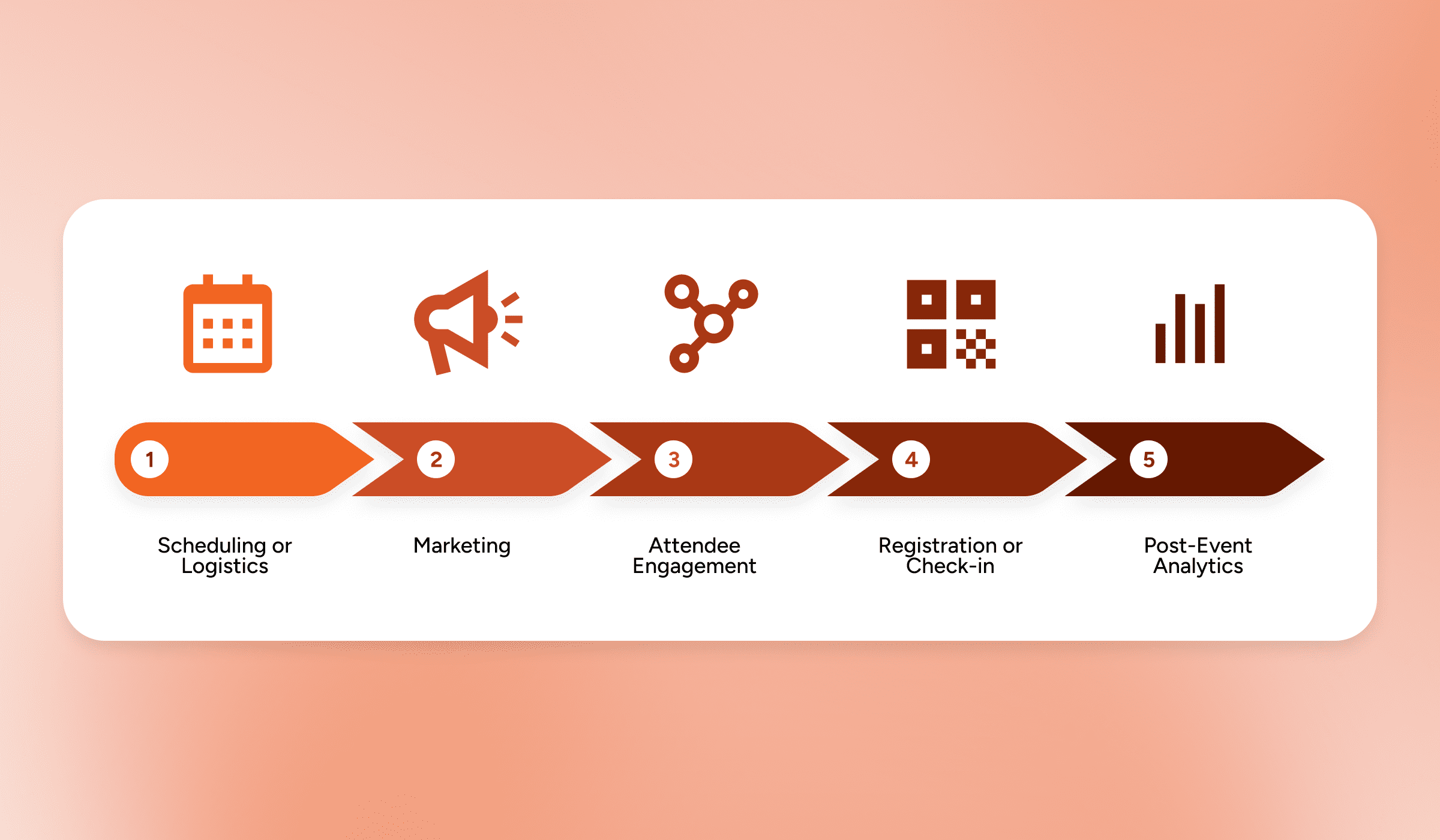
We’ll explore AI tools for event planning by where they fit in your process: scheduling and logistics, marketing and promotion, attendee personalization and engagement, registration and check-in, and post-event data analysis.
For organizers looking for built-in AI tools from the start, MomentiveIQ brings AI-driven automation and analytics directly into your event platform.
How AI Is Changing Event Planning
Artificial intelligence in event planning has moved well past the experimental phase. What started as a handful of scheduling shortcuts has grown into a full toolkit touching nearly every stage of the process, from the first logistics decisions to the last post-event report.
Most purpose-built event platforms now build AI natively. It moves the question from whether to use AI to how to use AI for event planning in a way that fits your workflow.
With every advance, however, comes some scrutiny. Regulations like the EU AI Act, effective February 2026, are pushing event tech vendors toward greater transparency about how attendee data, including biometric data such as facial recognition, is collected and used.
Whatever your event, the goal here is the same: supplying you with practical tools you can put to work.
AI Tools for Event Scheduling and Logistics
When it comes to scheduling and logistics, these AI tools will keep your event on schedule and ensure nothing slips through the cracks.
While each tool has its strengths, they cater to different audiences. A person planning a 50-person gala doesn’t need the same tools as someone planning a 5,000-attendee trade show.
Some notable AI tools for event scheduling and logistics include:
Motion
Motion builds your schedule for you. Feed it your tasks, deadlines, and priorities, and it automatically arranges your day around them, re-shuffling as deadlines shift or new items get added. For event planners juggling dozens of moving pre-event deadlines, including contracts, vendor confirmations, and marketing sign-offs, it’s a way to stop manually re-triaging your to-do list every morning.
Reclaim.ai
Reclaim protects your calendar rather than just filling it. It blocks off buffer periods around high-stakes meetings, and syncs tasks in from tools like Asana, ClickUp, and Monday.com so everything lives on one calendar. For teams coordinating with vendors across multiple platforms, it’s a practical way to keep individual schedules from getting buried under back-to-back calls.
Monday.com AI / ClickUp AI
Both platforms bring AI into cross-team coordination, surfacing task dependencies, flagging at-risk deadlines, and keeping vendor timelines visible to the entire team. These are the better fit once logistics stop being a one-person job: think multiple workstreams that all need to stay in sync without someone manually chasing status updates.
Cvent Vendor Marketplace
Cvent’s AI matching takes the guesswork out of sourcing venues and vendors. Tell it your event’s geography, group size, dates, and audience, and it surfaces vendors suited to that specific combination, a meaningful time-saver over sourcing manually or working through a generic directory.
AI Tools for Event Marketing and Promotion
Good event marketing and promotion is critical to building a successful event. In a sea of noise, how can your event stand out?
AI event management tools take your event marketing to the next level and leave a lasting impression before the event has even started.
Some notable AI tools for event marketing and promotion include:
ChatGPT
ChatGPT is strong at drafting shorter, high-turnover content: email campaigns, social copy, and quick sponsorship assets. It works well when you need to move fast on a single deliverable or generate multiple variations of the same message.
Draft a single deliverable in ChatGPT, like a social media campaign or a short email.
Claude
Claude is more effective for longer, multi-page documents where consistency of tone and structure matters across sections. Use it when building a full sponsorship deck or a detailed run-of-show rather than a single social post.
A good workflow is to draft your sponsorship deck outline in Claude first, then use it to generate the shorter marketing copy that pulls from the same messaging.
Jasper AI
Jasper is built for teams producing marketing assets at volume and needing them to sound consistent across every channel. It learns your brand voice once and applies it across emails, ads, and social posts from there.
Set up your brand voice profile in Jasper before your first campaign so every asset, from the save-the-date email to the final reminder post, sounds like it came from the same team.
Canva (Magic Studio)
Canva’s AI tools let anyone go from a rough idea to a finished graphic, no design background required. It handles social graphics, event signage, and email headers with a massive template library to start from.
Use Magic Studio to generate a handful of design variations for your event’s key visual, then pick one and use Canva’s brand kit to apply it consistently across every touchpoint.
Synthesia
Synthesia turns text into video, complete with AI avatars and voiceovers in more than 130 languages. It’s a fast way to produce promo videos or event announcements without a camera crew or a multilingual production budget.
Script a 30-second save-the-date announcement and use Synthesia to localize it into two or three languages if your attendee base is international.
AI Tools for Attendee Personalization and Engagement
Just like your marketing and promotion needs to stand out from the crowd, so do your attendee interactions. When your event makes attendees feel welcome, it leaves a positive impression and makes them more likely to return for future events.
Some notable AI tools for attendee personalization and engagement include:
Grip
Grip uses AI matchmaking to connect attendees based on their goals, interests, and profile data, then suggests a personalized agenda built around who they’re likely to want to meet. Instead of a generic session list, each attendee gets recommendations that reflect why they actually registered.
Have attendees fill out a few goal-oriented fields at registration so Grip’s matching has a real signal to work from, not just job title.
Whova
Whova builds AI-powered networking suggestions and a personalized app feed for each attendee, plus real-time engagement analytics so organizers can see what’s landing during the event, not just after.
Use mid-event live engagement data to flag underperforming sessions and adjust the promotion of later sessions on the fly, rather than waiting for the post-event report to find out what didn’t work.
Swapcard
Swapcard is built around matchmaking and session recommendations, and it’s especially common at B2B conferences where attendees are there specifically to find the right people to talk to.
Use Swapcard’s matchmaking specifically for sponsor and exhibitor introductions. It’s a simple way to show sponsors measurable networking ROI, not just booth traffic.
Eventbrite AI chatbots
Eventbrite’s AI chatbots handle instant attendee questions (parking, schedule changes, session locations) at scale, without organizers fielding the same five questions over and over during the event.
Provide the chatbot with the FAQ and logistics details ahead of time so it can answer specific questions about your event.
AI Tools for Registration and Check-In
Just as AI was a key partner in the build-up to the event, once it’s game time, AI registration and check-in tools can turn an attendee’s frustration into an effortless experience.
Some notable AI tools for registration and check-in include:
Fielddrive
Fielddrive uses facial recognition check-in to move attendees through the door in seconds rather than minutes, and it’s especially strong in enterprise and large-conference settings where long lines are the norm.
Pair Fielddrive with pre-event photo capture during registration so attendees never have to stop and pose on-site; they just walk through.
vFairs
vFairs combines registration, facial recognition, and AI in one platform, and it’s earned a spot as a Gartner Leader alongside Cvent and RainFocus.
Use vFairs when you need registration and check-in to work together as one system, rather than stitching two separate tools together, particularly useful for hybrid events where the same platform also needs to handle virtual attendees.
InEvent
InEvent uses AI to automatically generate landing pages and registration forms, then carries that same intelligence into on-site smart check-in.
Let InEvent generate your first registration page draft, then customize from there. It’s a faster starting point than building a form from scratch, especially for organizers running several events a year with similar formats.
AI Tools for Post-Event Data Analysis
Zenus
Zenus uses ethical facial analysis to measure impressions, demographics, and sentiment at the venue level, without requiring attendees to opt into a facial-recognition check-in system.
Use Zenus at high-traffic points like the expo floor or main stage entrance to see which moments actually drew a crowd, not just which sessions had the most registrations.
Qualtrics (Text iQ / Stats iQ)
Qualtrics applies natural language processing to open-ended survey responses, automatically categorizing feedback and surfacing sentiment trends that would take hours to tag by hand.
Run your post-event survey’s open-text questions through Text iQ to identify universal themes, rather than spending the meeting reading through comments one by one.
Bizzabo
Bizzabo ties engagement scoring directly to session data and attendee profiles in one system, so you can see which sessions underperformed and which attendees were most engaged without exporting data between tools.
Use the engagement scores to build a shortlist of your most engaged attendees for personalized post-event outreach, they’re your most likely repeat registrants and referral sources.
MomentiveIQ’s AI Analytics layer surfaces relevant insights natively across the entire Momentive ecosystem, so post-event data doesn’t have to live in a separate tool. See how your organization can benefit from one connected platform.
Tips for Getting Started with AI in Your Event Planning Workflow
When it comes to AI-powered event tools, take a strategic approach. Knowing your organization or work processes, look at what area takes up the most of your time, where an AI tool could complement your efforts and save you time.
Start with one tool addressing one area and be deliberate with your rollout. Check the tool’s outputs and remember that the quality of the tool’s response is directly tied to the inputs you give it.
Your event management technology likely has built-in AI tools you can utilize before adopting an endpoint solution.
Note: If you’re using facial recognition or other attendee data, loop in IT and compliance early, especially given regulations like the EU AI Act, which are now shaping how that data can be collected and used. It’s important to stay in compliance, not only for your organization, but more so for your attendees and their experience.
As you use AI tools, make sure you’re measuring ROI metrics such as time saved, attendee check-in speed, and engagement score to ensure the tools are working as marketed.
No matter what tools you start with, collaborating with AI is an easy way to save time on event planning, while optimizing the attendee experience, and creating an unfortgetable event.
Momentive’s event management software already brings AI into registration, check-in and badging, attendee tracking, and lead capture, all in one platform. MomentiveIQ extends that further, layering AI analytics and automation across your entire event ecosystem so insights and workflows stay connected instead of scattered across separate tools.
FAQ
The best tool depends on where you need help most. Scheduling and logistics tools like Motion and Reclaim.ai keep pre-event deadlines on track, marketing tools like ChatGPT, Claude, and Canva speed up content creation, and platforms like Grip and Whova personalize the attendee experience. Rather than one “best” tool, most organizers end up using a small mix, one per category, based on what their event actually needs.
AI scheduling tools like Motion and Reclaim.ai automatically build and adjust your calendar around deadlines and priorities, so you’re not manually re-triaging your to-do list as things shift. For teams coordinating across multiple workstreams, Monday.com AI and ClickUp AI go a step further, surfacing task dependencies and flagging at-risk deadlines across the whole planning team, not just one person’s calendar.
Yes. Tools like Grip and Swapcard use AI matchmaking to recommend sessions and connections based on each attendee’s goals and profile, rather than showing everyone the same generic agenda. Whova adds real-time engagement analytics on top of that, so organizers can see what’s resonating during the event, not just in a report afterward.
ChatGPT and Claude are strong for drafting content, from quick social posts to full sponsorship decks, while Jasper AI keeps that content consistent across a team producing assets at volume. Canva’s Magic Studio rounds it out on the design side, turning a rough idea into a finished graphic without a designer.
Yes. Many of the tools covered here, including ChatGPT, Canva, and Reclaim.ai, offer free or low-cost tiers, which makes them just as accessible to an independent planner or a small nonprofit running one event a year as they are to a team managing a 5,000-person trade show.
Modern event management platforms are increasingly building AI directly into core functions like registration, check-in, and post-event analytics, rather than requiring a separate tool for each. That kind of embedded AI tends to work best when it’s already part of the platform you’re using day to day, cutting down on the need to stitch together multiple point solutions just to get the same result.