
What Is Association Management Software (AMS)?

Spreadsheets work until they don’t. For most associations, the breaking point is somewhere around a few hundred members: too many renewals to chase manually, too many events to track in a shared doc, too many moving pieces for any one person to hold in their head. That’s when association management software earns its place.
What Is Association Management Software (AMS)?
Association management software (AMS) is an integrated platform that professional and trade associations use to run daily operations from one place: storing member records, collecting dues, registering events, sending communications, and reporting on it all. It replaces the spreadsheets and disconnected tools a growing membership organization quickly outgrows.
The defining trait of an AMS is that one database sits underneath everything. When a member renews, that single action updates their record, the finance ledger, and your reporting at once, with no one re-keying data between systems.
A state nurses association, for example, might use an AMS to renew 8,000 members, run an annual conference, report continuing education credits to a licensing board, and see all of it on one dashboard. That’s the job an AMS is built for.
How Does Association Management Software Work?
An AMS centralizes member data and then automates the work that touches it. Most platforms follow this flow:
- Store data in one place. Every member and organization record, contact details, demographics, history, and payments, lives in a single cloud-based database.
- Bring members in. A prospect joins through a form on your website, and their record is created automatically, no manual entry.
- Bill and renew. The system invoices dues, processes online payment, and schedules renewals, whether annual, on the join anniversary, or pro-rated.
- Run programs and events. Members register for conferences and courses through a portal, and the AMS tracks attendance, payments, and credits earned.
- Communicate and engage. Targeted email, a self-service member portal, and an online community all pull from the same member data.
- Report and act. Dashboards show renewal, revenue, and engagement trends, so staff can see what’s working and act on it.
Because every step reads and writes to the same database, the data stays consistent. That’s the difference between an AMS and a stack of separate tools bolted together.
Key Features of Association Management Software
Most AMS platforms share a core set of features. Here’s what to expect:
- Membership database. The central record of every member and organization, including contact details, history, and engagement data.
- Member portal. A self-service hub where members update profiles, pay dues, register for events, and check certification status around the clock.
- Dues and subscription billing. Automated invoicing and online payment for dues, plus billing for journals, newsletters, and other subscriptions.
- Event and conference management. Registration, payment, sponsorships, and attendee data for everything from a webinar to an annual meeting.
- Reporting and dashboards. Pre-built and custom reports that surface renewal, revenue, and engagement trends.
- Financial management. A sub-ledger for billing, invoicing, and receipting that connects to your accounting tool.
- Online community. A built-in space that keeps members connected between events, not just once a year.
- AI and predictive analytics. Intelligent workflows that flag at-risk members and surface insight from your data before you have to ask.
Types of Association Management Software
Not every AMS is built the same way. There are several different types of software options your organization should consider:
| Type | What it is | Best for |
| All-in-one AMS | Membership, events, website, payments, and reporting in one system | Small and mid-size associations that want everything in one place |
| CRM-based AMS | An AMS built on a CRM platform like Salesforce | Growing and enterprise associations that need deep data and automation |
| Standalone membership tools | Lightweight software focused on records and dues | Very small or new associations with simple needs |
| Enterprise AMS | Highly configurable platforms with advanced integrations | Large associations with complex membership structures and chapters |
An AMS built on a CRM, like Nimble AMS on Salesforce, gives associations the reporting and automation depth of an enterprise system alongside association-specific features like dues billing and CE tracking.
Benefits of Association Management Software
AMS alleviate the manual work that small staff associations deal with. The payoff usually shows up as:
- Time back for staff. Automating dues runs, renewals, and receipting removes exports that eat a workweek.
- Higher retention. A member who can renew, register, and find resources without emailing the office is a member who renews again.
- Revenue you can see. Connected billing and reporting show which programs earn and which don’t.
- One source of truth. No more reconciling three systems that disagree about who’s a current member.
- Decisions from data. Analytics flag at-risk members early, while there’s still time to reach them.
Association Management Software vs. CRM
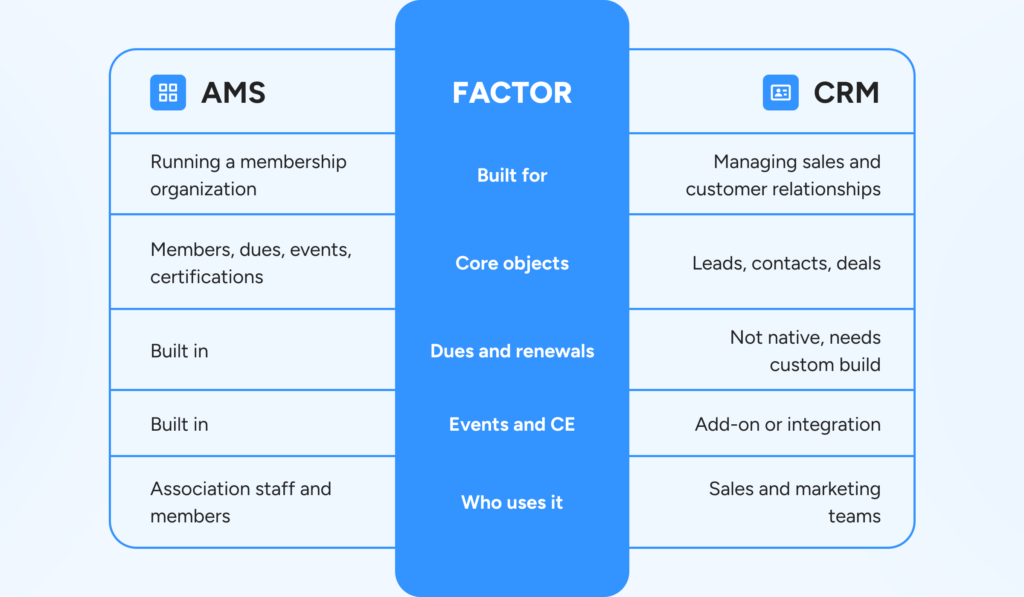
This is the comparison associations get stuck on most, because an AMS and a CRM overlap. Both store contact data. The difference is what they’re built to do with it. A general CRM can be configured to run an association, but you’ll pay to build what an AMS already does. Some platforms give you both: an AMS built on a CRM foundation pairs association-specific features with a CRM’s data engine. A CRM handles relationships; an AMS handles the whole membership lifecycle.
Here’s a comparison table of the two solutions:
| Factor | Association management software (AMS) | CRM |
| Built for | Running a membership organization | Managing sales and customer relationships |
| Core objects | Members, dues, events, certifications | Leads, contacts, deals |
| Dues and renewals | Built in | Not native, needs custom build |
| Events and CE | Built in | Add-on or integration |
| Who uses it | Association staff and members | Sales and marketing teams |
Who Needs Association Management Software?
If your organization has members, an AMS was built for you. It fits best once you’ve outgrown spreadsheets and disconnected tools. That usually means:
- Professional and trade associations managing dues, certifications, and an annual conference.
- Individual-membership societies with thousands of members and continuing education requirements.
- Chapter-based and federated organizations that need consistent data across a national office and local chapters.
- Small-staff associations where three or four people cover every function and automation is the only way to keep up.
Small teams usually want an all-in-one platform covering membership, events, a website, and payments. Enterprise associations tend to need more: modern e-commerce, AI and predictive analytics, and integrations with a learning management system and career center.
How to Choose Association Management Software
The right AMS is the one that fits your organization’s needs, not the one with the longest feature list. Keep four things in view:
- Total cost over time. Pricing ranges widely, from around $50 to $200 per month for entry-level tools to several thousand a month for enterprise platforms, and total cost includes implementation, support, and customization. Our breakdown of AMS cost factors covers what to budget for.
- Fit with your requirements. Work with your board to rank what you actually need, deeper reporting, specific integrations, or more flexibility, then measure vendors against that list.
- Integrations and scalability. Confirm the AMS connects to your accounting tool, LMS, and career center, and that it can grow as membership does.
- Support and partnership. You’re choosing a long-term relationship, not just software. Look at implementation, ongoing support, and the vendor’s track record with associations your size. Our guide to choosing the right AMS walks through the questions to ask.
At Momentive Software, our association management software is built for this work, from small-staff teams to enterprise associations, with Nimble AMS bringing the Salesforce platform to member management. For where the sector is heading, the 2026 Association Trends Study is a good next read.
Frequently Asked Questions
Association management software (AMS) is an integrated platform associations use to run daily operations, storing member records, collecting dues, registering events, sending communications, and reporting, all from one database. It replaces the spreadsheets and disconnected tools a growing membership organization outgrows.
AMS stands for association management software, also called an association management system. Both refer to the same category of tool: software that helps professional and trade associations manage members, dues, events, and reporting in one place.
A CRM manages sales and customer relationships around leads and deals. An AMS is built to run a membership organization, with dues, renewals, events, and certifications built in. A CRM can be configured to run an association, but an AMS does it out of the box.
An AMS built on Salesforce runs on the Salesforce CRM platform. Nimble AMS is built on Salesforce, so associations get Salesforce’s data management and automation alongside association-specific features like dues billing, event management, and CE tracking.
Pricing varies with member count and features. Entry-level tools can start around $50 to $200 per month, while enterprise platforms run into the thousands, and total cost includes implementation, support, and customization.
Most modern AMS platforms are cloud-based, meaning the software and data are hosted online rather than on a local server. That keeps every user on the latest version, lowers the cost of ownership, and lets the vendor handle updates, security, and backups.
Struggling to keep your volunteer program organized? Discover what volunteer management software can do for your organization.