AI Training for Nonprofits, Associations

In 2026, 91% of organizations are using AI, but only 29% are operationalizing it. How can you use AI tools effectively for your nonprofit or association? Develop an AI training program.
This guide covers what AI skills your team actually needs by role, where to get free and low-cost training, how to write better prompts, and how to build a 30/60/90-day internal upskilling plan you can run without a dedicated training team or a large budget.
Whether you lead a nonprofit or an association, meaningful AI training is achievable, and most of the best resources are free.
Why AI Training Is the Cheapest Option
Training is often overlooked, but it’s often why an AI tool isn’t used properly.
When your team knows how to prompt an AI tool tool skillfully, understands the tool’s limits, and knows what governance guardrails exist, they’re in the right position to maximize value from the tool.
Training also reduces risks. If your team takes a figure-it-out-as-we-go approach, it leaves your organization vulnerable. From sharing constituent data with unapproved tools to publishing outputs without a review cadence, AI training closes use gaps before they become liability problems.
The plus side? AI training courses are widely available from the AI makers themselves, as well as from reputable industry leaders. Google, Microsoft, Anthropic, NTEN, TechSoup, and others have built substantial learning programs that nonprofits and associations can access at no cost.
What AI Skills Does Your Team Need?
If you’re starting a training program, the abundance of materials can be overwhelming. Where do you start?
Most organizations find one training program and run everyone through it. While that develops a baseline of skills, it produces inconsistent results because a fundraising director and a program coordinator don’t need the same AI skills.
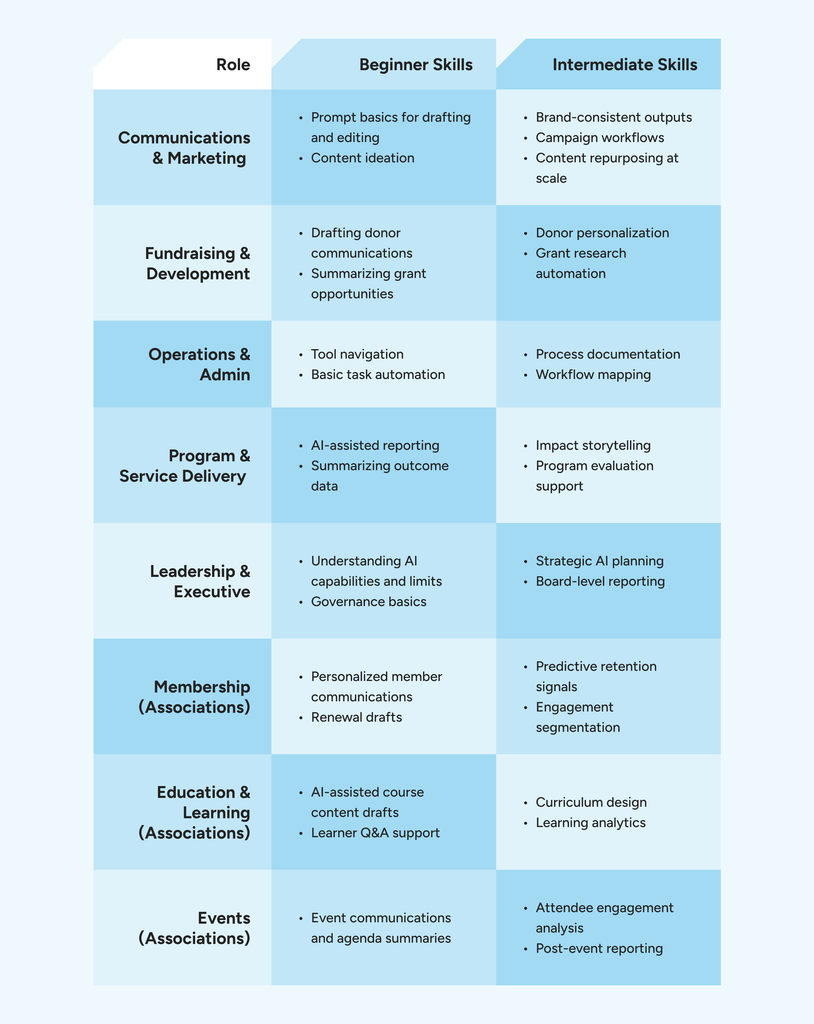
To build an effective training program, map training to skill levels. This chart explores common training scenarios.
| Role | Beginner Skills | Intermediate Skills |
| Communications & Marketing | Prompt basics for drafting and editing; content ideation | Brand-consistent outputs; campaign workflows; content repurposing at scale |
| Fundraising & Development | Drafting donor communications; summarizing grant opportunities | Donor personalization; grant research automation |
| Operations & Admin | Tool navigation; basic task automation | Process documentation; workflow mapping |
| Program & Service Delivery | AI-assisted reporting; summarizing outcome data | Impact storytelling; program evaluation support |
| Leadership & Executive | Understanding AI capabilities and limits; governance basics | Strategic AI planning; board-level reporting |
| Membership (Associations) | Personalized member communications; renewal drafts | Predictive retention signals; engagement segmentation |
| Education & Learning (Associations) | AI-assisted course content drafts; learner Q&A support | Curriculum design; learning analytics |
| Events (Associations) | Event communications and agenda summaries | Attendee engagement analysis; post-event reporting |
Train for the role first, and set aside paid time for staff to complete courses.
Free AI Training for Nonprofits and Associations
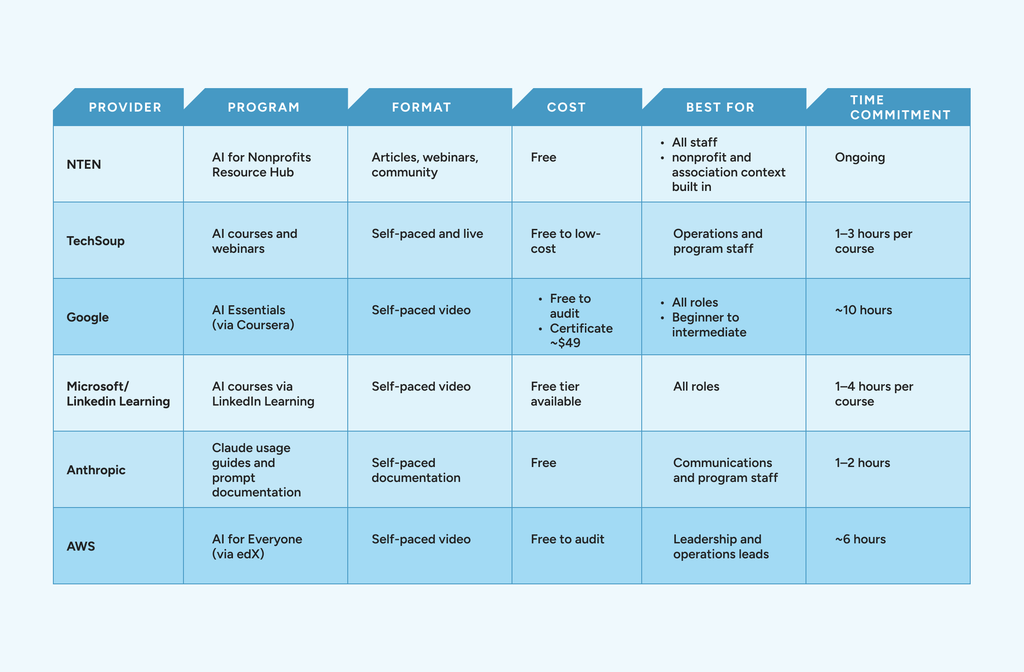
Several major providers have built programs specifically for the sector, and others offer general AI literacy courses that translate well with minimal adaptation.
| Provider | Program | Format | Cost | Best For | Time Commitment |
| NTEN | AI for Nonprofits Resource Hub | Articles, webinars, community | Free | All staff; nonprofit and association context built in | Ongoing |
| TechSoup | AI courses and webinars | Self-paced and live | Free to low-cost | Operations and program staff | 1–3 hours per course |
| AI Essentials (via Coursera) | Self-paced video | Free to audit; certificate ~$49 | All roles; beginner to intermediate | ~10 hours | |
| Microsoft / LinkedIn Learning | AI courses via LinkedIn Learning | Self-paced video | Free tier available | All roles | 1–4 hours per course |
| Anthropic | Claude usage guides and prompt documentation | Self-paced documentation | Free | Communications and program staff | 1–2 hours |
| AWS | AI for Everyone (via edX) | Self-paced video | Free to audit | Leadership and operations leads | ~6 hours |
Low-Cost Courses and Workshops Worth Paying For
While free training covers most of what a small team needs, paying makes sense when you need role-specific depth, cohort accountability, or a facilitator who understands sector context.
NTEN offers paid workshops for teams that wants structured peer learning. Some state nonprofit associations and regional associations also offer low-cost, facilitated AI workshops, often bundled with membership.
When evaluating paid options, look for programs that:
- Use real nonprofit or association scenarios rather than generic business examples
- Produce a practical output you can use after the session (a prompt library, a governance checklist, a workflow map)
- Cost less than a single day of consulting time.
If a course doesn’t meet those three criteria, the free options above will serve your team just as well.
A Prompt-Writing Primer for Non-Technical Communicators
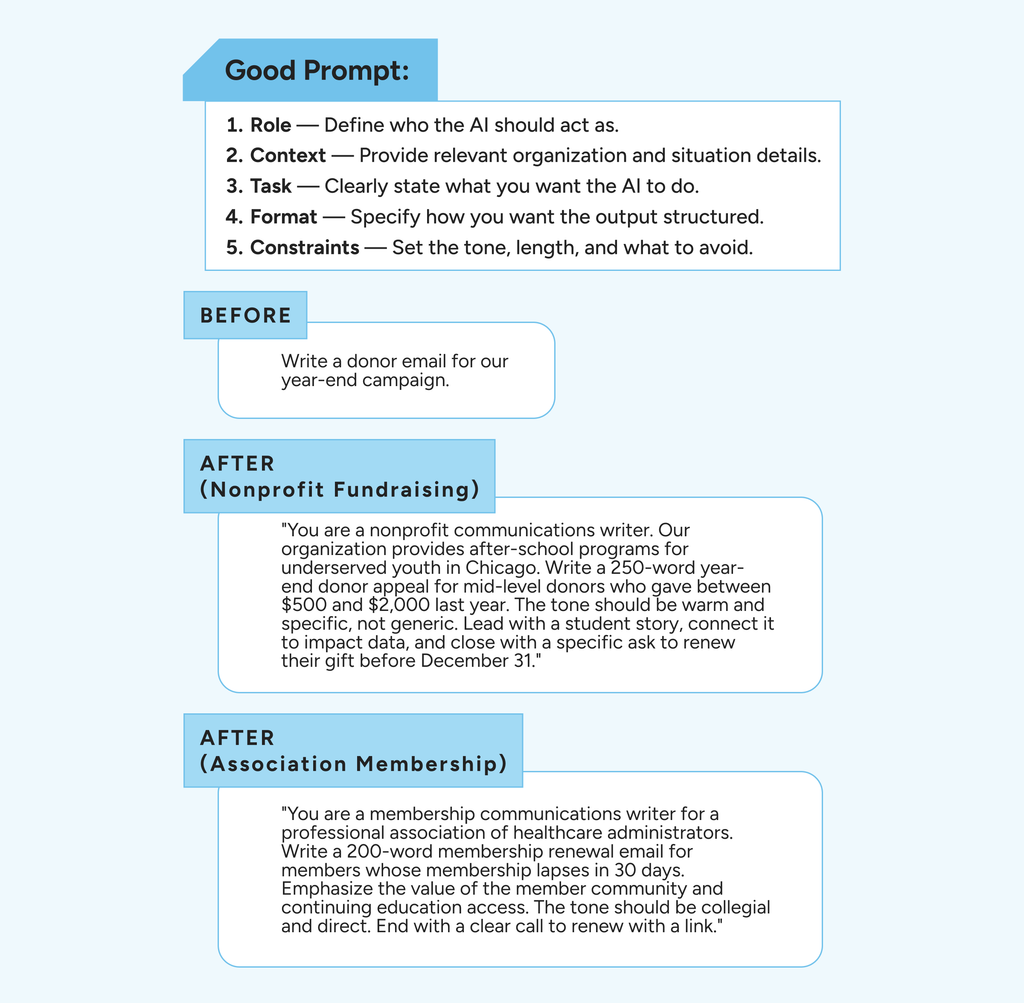
Prompts can make or break an AI. If your team isn’t operationalizing AI properly, start by exploring how you’re prompting it. The same AI produces dramatically different outputs depending on how you ask.
A good prompt has five components:
- A role: who you want the AI to act as
- Context: what the AI needs to know about your organization and situation
- A task: What you’re actually asking it to do
- A format: How you want the output structured
- Constraints: What to avoid, what tone to use, what word count to hit
Consider this example prompt:
Before:
Write a donor email for our year-end campaign.
After (nonprofit fundraising example):
“You are a nonprofit communications writer. Our organization provides after-school programs for underserved youth in Chicago. Write a 250-word year-end donor appeal for mid-level donors who gave between $500 and $2,000 last year. The tone should be warm and specific, not generic. Lead with a student story, connect it to impact data, and close with a specific ask to renew their gift before December 31.”
After (association membership example):
“You are a membership communications writer for a professional association of healthcare administrators. Write a 200-word membership renewal email for members whose membership lapses in 30 days. Emphasize the value of the member community and continuing education access. The tone should be collegial and direct. End with a clear call to renew with a link.”
With that level of detail, the AI tool will create a comprehensive output specific to your audience, while following the details your team provided. A human should still check and edit the result.
Training and reviewing prompts provide a good foundation, but to improve utilization, you need internal enablement.
Name an AI Champion: An Internal Enablement Approach
Designate an AI champion: a staff member who owns internal enablement. The position shouldn’t be a technical role; find an individual passionate about AI and empower them to support other members of your team.
Some examples of what an AI champion can do include:
- Curates useful resources for their colleagues
- Runs informal lunch-and-learns
- Builds and maintains the organization’s internal prompt library
- Serves as the first point of contact when staff has questions about what AI can and can’t do.
Look for someone who is curious, credible with peers, and visible throughout departments. For nonprofits, the AI champion could be communications lead, an operations manager, or a program director who has already been experimenting on their own. For associations, it’s likely a membership or education staff member who often fills the role naturally, particularly if they’re already building content or member-facing communications.
The AI champion doesn’t replace a good training program. Still, they do help sustain a program by keeping the conversation active, sharing what’s working, and lowering the barrier for staff who are hesitant to start.
Common Training Mistakes and How to Avoid Them
AI tools fail when things move too fast, get too big, or staff isn’t supported. Avoid these common training mistakes:
Problem: Training everyone at once
If you take the guardrails off and put everyone in training at once, you’ll find no one goes deep enough in the first pass to become an internal resource.
Solution: Start with a small pilot cohort and identify an internal champion
Problem: Choosing tools before training
Committing to a tool without training on it is like riding a bike without training wheels. You’ll get some scrapes and bruises along the way.
Solution: Evaluate tools before selecting them. Whether that’s a demo or a short training course, see whether the tools fit your organization.
Problem: Treating training as a one-time thing
Training should be ongoing. Because AI tools evolve so quickly, your team needs to evolve with them.
Solution: Hold regular training to stay current on features. Have your AI champion lead lunch-and-learns to keep training current.
A good approach to all common training mistakes is to start small, make it practical, document what you learn, and build from there.
Your 30/60/90-Day AI Upskilling Plan
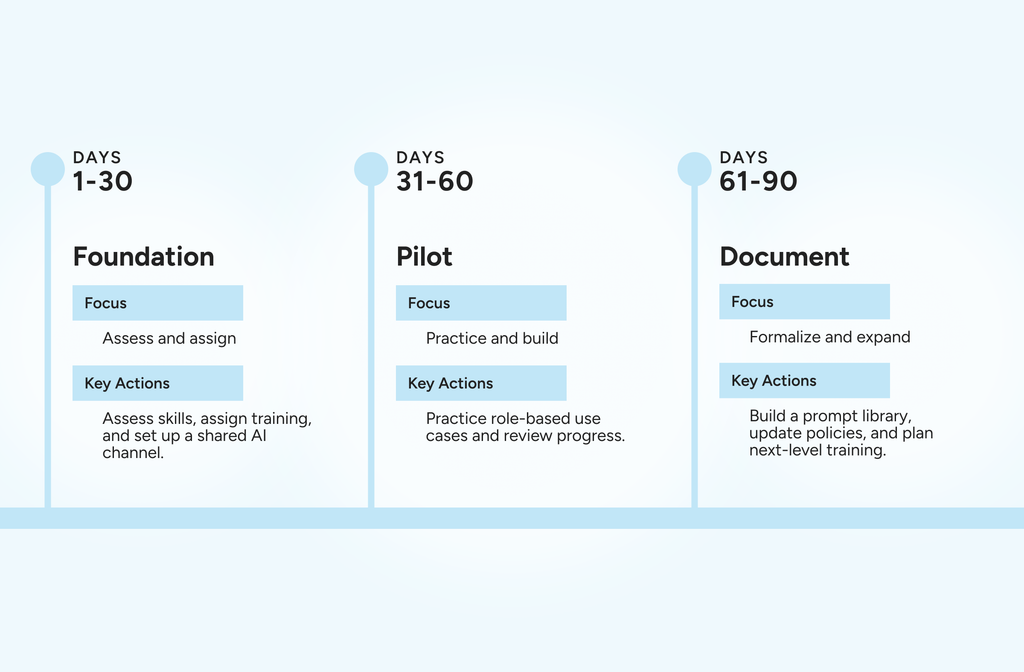
With the foundation laid and your champion supporting the framework, it’s time to tie it all together and create a 30/60/90-day upskilling plan.
A 30/60/90-day plan gives your organization a structured path from zero to operational AI literacy. It’s designed for a small pilot cohort first, with broader rollout built into the back half of the 90 days.
| Phase | Timeline | Focus | Key Actions |
| Foundation | Days 1–30 | Assess and assign | Survey current skill levels by role; identify your AI champion; assign beginner training from the free programs list; open a shared channel for questions and prompt examples |
| Pilot | Days 31–60 | Practice and build | Run structured practice sessions around two to three use cases per role; build first internal prompt examples; hold a mid-point check-in to capture what’s working |
| Document | Days 61–90 | Formalize and expand | Document a prompt library; run a retrospective; update your AI policy to reflect what staff are now doing; identify staff ready for intermediate training |
Keep the pilot cohort small, pick use cases that produce something immediately useful rather than theoretical exercises, and treat the prompt library as a living document that staff adds to over time rather than a finished product.
By day 90, your team will have a shared vocabulary, real examples of AI-assisted work, and a governance foundation that makes broader rollout lower-risk.
Next Steps: Pair Training with the Right Tools
Building AI literacy is the right first investment, but the second should be a purpose-built AI platform. Generic tools without governance, auditability, or sector-specific context aren’t a great fit for nonprofits and associations.
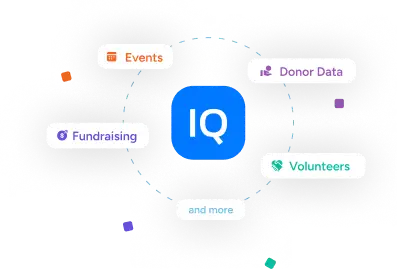
MomentiveIQ gives a newly trained team a governed place to apply what they’ve learned.
It automates routine workflows that consume staff time across both nonprofits and associations, surfaces predictive insights about donors, members, and constituents, and keeps every action governed and auditable so your board and leadership team can see exactly how AI is being used.
MomentiveIQ is built on 40 years of sector knowledge and included in existing Momentive subscriptions, so getting started doesn’t require a new budget line. Training builds capability, and MomentiveIQ puts it to work inside the systems that already run your organization. See MomentiveIQ in action and, request a demo.
Frequently Asked Questions
What is the best free AI training for nonprofits?
Several strong free options exist, but the best starting point depends on your team’s role. NTEN’s AI for Nonprofits Resource Hub is the most sector-specific option, built for nonprofit and association audiences. Google’s AI Essentials is the strongest general-purpose beginner program and is free to audit on Coursera. For communications staff specifically, Anthropic’s prompt documentation is practical, immediately applicable, and free. The full curated list with time commitments is in the table above.
How do you train nonprofit staff to use AI?
Start small. Run a pilot cohort of four to eight people across roles rather than training everyone at once. Assign beginner training from the free programs listed above, focused on practical use cases tied to each person’s actual job. Designate an AI champion to sustain adoption between formal sessions, and build a prompt library that grows as your team learns. The 30/60/90-day plan above gives you a full roadmap.
What is an AI champion, and does our nonprofit need one?
An AI champion is a staff member who owns internal AI enablement—not as a technical role, but as a curiosity and communication role. They curate resources, run lunch-and-learns, maintain the organization’s prompt library, and answer peer questions. Most nonprofits and associations benefit from having one. Technical expertise isn’t the qualifier: curiosity, credibility with colleagues, and visibility across departments matter more.
How do you write better AI prompts for nonprofit communications?
Start with the five components of a strong prompt: a role, context, a task, a format, and constraints. Being specific about your audience and organizational context produces better outputs than a vague request—the before-and-after examples in this guide illustrate the difference. Treat the first output as a draft to review and iterate on, not a finished product. A human should always review before publishing or sending anything.
How long does it take to upskill a small nonprofit team on AI?
With a structured plan, a small pilot cohort can reach functional AI literacy in 90 days: basic prompt skills and two to three practical use cases per role in the first 30 days, a documented prompt library and governance foundation by day 90. The timeline depends more on how consistently your team practices than on the material’s complexity. Intermediate training for ready staff typically follows in months four through six.
Do you need technical staff to run AI training?
No. Every free program in this guide is designed for non-technical learners and doesn’t require a technical facilitator. A designated AI champion with no technical background can run internal sessions effectively. Consistent practice, practical use cases, and clear governance drive results, none of which require a technical hire.