
10 Best Zeffy Alternatives for Nonprofits in 2026

Zeffy is a free fundraising platform for nonprofits that covers platform and card processing fees and is funded by optional donor contributions at checkout. If you’re comparing Zeffy alternatives, you are probably running into one of three challenges: another ask at check out on top of your donor’s giving, event and auction tools that can’t cover big events like galas, or a donor record you want more control over. If you’re facing any of these challenges, then a Zeffy alternative can help. A Zeffy alternative is any fundraising platform nonprofits use instead of Zeffy for different pricing, deeper event tools, or a stronger donor CRM.
This guide compares 10 alternatives to Zeffy, including GiveSmart, Givebutter, and Donorbox, by fees, features, and organization size. Zeffy competitors price in very different ways, so each entry shows who pays. Prices were verified in October 2026.
Key takeaways:
- Zeffy charges nonprofits $0 in platform and processing fees. The cost moves to donors through an additional contribution ask at checkout: Zeffy says 2 out of 3 donors leave one, and Donorbox reports a 17% default on gifts up to $99.49.
- Most Zeffy alternatives charge the nonprofit instead of donors through subscriptions (Little Green Light from $45 a month) or percentage fees (Donorbox 2.95%, GoFundMe Pro 3%, OneCause 5%).
- Zeffy runs online and silent auctions, but no auctioneer-led live auction, paddle raise, or Fund-a-Need tools. GiveSmart, RallyUp, and OneCause are built for galas and fundraising events.
- GiveSmart offers a pay-only-when-you-raise model, where a plan starts at $0.
- The right Zeffy alternative depends on your size and events: budget-first, event-heavy, or CRM-first.
Why Do Nonprofits Look for Zeffy Alternatives?
Nonprofits look for Zeffy alternatives when the tradeoffs outweigh the strengths. The reasons to look elsewhere are often donor-side cost, branding, payout timing, event depth, integrations, and support speed.
Why look for a Zeffy Alternative?
- Donor-side cost and checkout confusion: In the US and Canada, Zeffy pre-fills a suggested contribution that donors can lower or set to $0, and some donors don’t realize it is optional. Trustpilot reviewers report unexpected tips, but Zeffy has a refund process for donors who add one unintentionally.
- Receipts follow a Zeffy template: Tax receipts use a standardized template where you can add your logo but not edit the content, and year-end receipt emails come from Zeffy rather than your organization.
- Control over payout timing: Payouts go out weekly on Mondays (the default) or monthly on the first Monday, after a 1 to 3 business day fraud review. Next-day payouts are limited to eligible organizations, and payouts can’t be triggered manually. Capterra reviewers also note the weekly or monthly settlement.
- Payments run through Zeffy: Zeffy’s statement descriptor always starts with “ZEFFY”, and you can’t connect your own Stripe account, so donations pass through Zeffy’s Stripe Connect setup before payout.
- Gala-specific gaps: Zeffy’s auction tool is online and timed, with an optional start date, auto-bidding, anti-sniping, and manually recorded offline bids. An independent review cites no auctioneer-led live auction, Fund-a-Need, or paddle raise tool.
- Integrations: Zeffy connects to QuickBooks Online and Zapier, and offers a read-only API for payments, contacts, and campaigns, plus payment webhooks. Confirm that covers what your CRM needs.
- Support options: Zeffy offers email, chat, and calls arranged after you reach out by email or chat, with email responses listed at 1 to 6 business hours.
What Should You Look For in a Zeffy Alternative?
Look for the platform that matches how you actually raise money, not the longest feature list. When you compare alternatives to Zeffy, check seven things: who pays the fees, event and auction depth, donor CRM and reporting, payout speed and data ownership, branding control, live-event support, and integrations.
Total cost; Who pays?
Some tools move the cost to donors; others charge the nonprofit. Add platform fees, processing, and any donor-side contribution at your real costs.
Event and auction depth
For galas and fundraising events, check for live auctions, paddle raise, Fund-a-Need, ticketing, and check-in, not only online bidding.
Donor CRM and reporting
Check how much giving history, segmentation, and reporting come standard versus as a paid add-on.
Payout speed and data ownership
Ask how fast funds reach your bank and whether you control the processor and donor payment details if you leave.
Branding control
Check whether forms, receipts, and emails carry your brand or the platform’s.
Support during live events
Confirm you can reach a person on event night, not only by email.
Integrations
Check whether it connects to your CRM, accounting, and email tools, and offers an API.
Is Zeffy Really Free? How Zeffy’s Pricing Works
Yes, for your nonprofit. Zeffy fees come to $0: no platform fee and no payment processing fee. Zeffy funds itself through an optional contribution donors add at checkout. Donors pay that contribution, not the organization, and Zeffy says 2 out of 3 donors leave one.
But the default check out ask matters. Donorbox reports the suggested contribution is 17% on gifts up to $99.49 and 15% on larger gifts. Zeffy states that the suggested percentage falls as the donation grows. At the reported default, a donor giving $50 is asked for $58.50.
| Who pays | On Zeffy |
|---|---|
| Your nonprofit | $0 platform fee, $0 processing fee |
| Your donors | Optional contribution at checkout, reported default 17% up to $99.49 and 15% above |
Zeffy Alternatives Compared
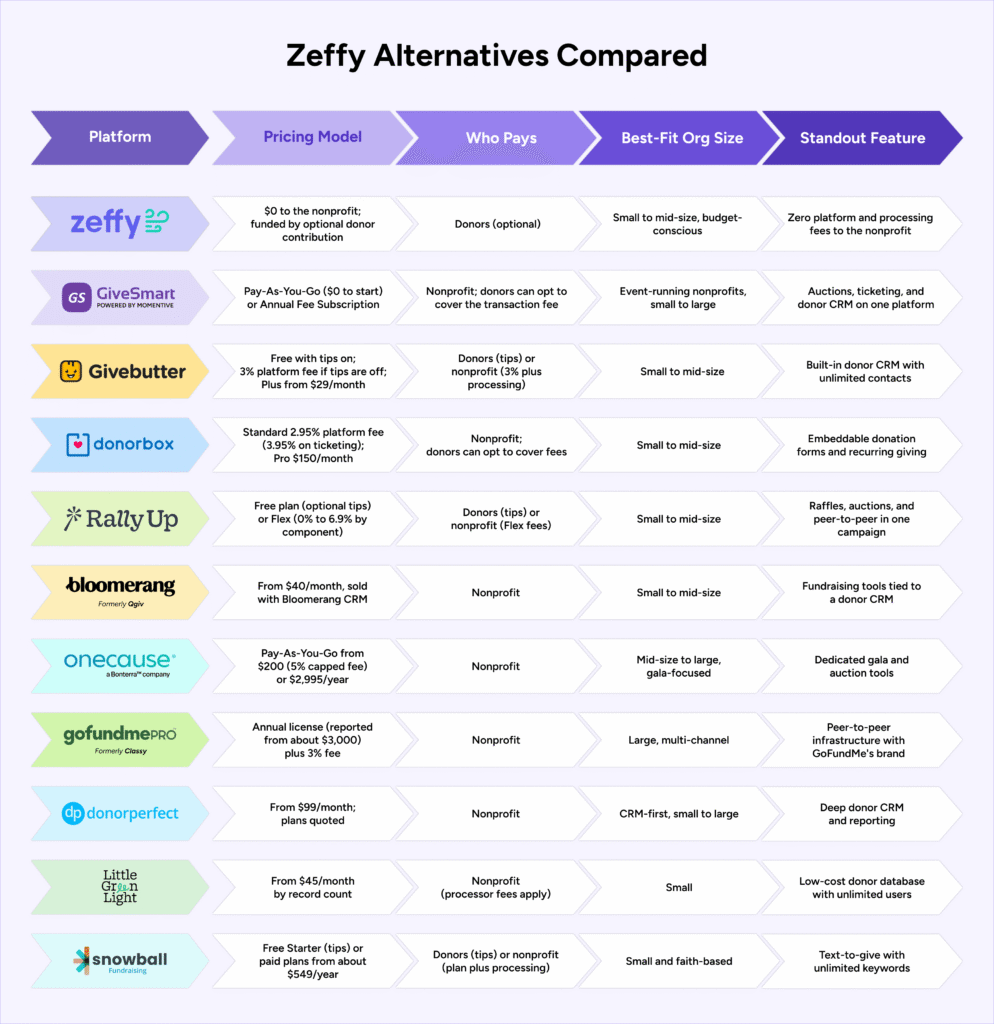
This table compares Zeffy and the 10 alternatives by pricing model, who pays, best-fit organization size, and standout feature. Pricing reflects vendor pages and dated third-party sources as of October 2026.
| Platform | Pricing Model | Who Pays | Best-Fit Org Size | Standout Feature |
|---|---|---|---|---|
| Zeffy | $0 to the nonprofit; funded by optional donor contribution | Donors (optional) | Small to mid-size, budget-conscious | Zero platform and processing fees to the nonprofit |
| GiveSmart by Momentive | Pay-As-You-Go ($0 to start) or Annual Fee Subscription | Nonprofit; donors can opt to cover the transaction fee | Event-running nonprofits, small to large | Auctions, ticketing, and donor CRM on one platform |
| Givebutter | Free with tips on; 3% platform fee if tips are off; Plus from $29/month | Donors (tips) or nonprofit (3% plus processing) | Small to mid-size | Built-in donor CRM with unlimited contacts |
| Donorbox | Standard 2.95% platform fee (3.95% on ticketing); Pro $150/month | Nonprofit; donors can opt to cover fees | Small to mid-size | Embeddable donation forms and recurring giving |
| RallyUp | Free plan (optional tips) or Flex (0% to 6.9% by component) | Donors (tips) or nonprofit (Flex fees) | Small to mid-size | Raffles, auctions, and peer-to-peer in one campaign |
| Bloomerang Fundraising (formerly Qgiv) | From $40/month, sold with Bloomerang CRM | Nonprofit | Small to mid-size | Fundraising tools tied to a donor CRM |
| OneCause (by Bonterra) | Pay-As-You-Go from $200 (5% capped fee) or $2,995/year | Nonprofit | Mid-size to large, gala-focused | Dedicated gala and auction tools |
| GoFundMe Pro, formerly Classy | Annual license (reported from about $3,000) plus 3% fee | Nonprofit | Large, multi-channel | Peer-to-peer infrastructure with GoFundMe’s brand |
| DonorPerfect | From $99/month; plans quoted | Nonprofit | CRM-first, small to large | Deep donor CRM and reporting |
| Little Green Light | From $45/month by record count | Nonprofit (processor fees apply) | Small | Low-cost donor database with unlimited users |
| Snowball | Free Starter (tips) or paid plans from about $549/year | Donors (tips) or nonprofit (plan plus processing) | Small and faith-based | Text-to-give with unlimited keywords |
10 Zeffy Alternatives for Nonprofit Fundraising
These 10 Zeffy competitors range from tip-funded platforms to donor CRMs and gala systems. Each entry covers cost, features, and who it is built for, and how it differs from Zeffy.
1. GiveSmart by Momentive
GiveSmart is an all-in-one fundraising platform built for nonprofits running galas, auctions, and year-round giving campaigns. Unlike Zeffy, GiveSmart charges the nonprofit a transaction fee only when payments are accepted. The Boys & Girls Club of Lawrence tripled its fundraising totals in the second year of its Celebrity Softball Weekend after adding a paddle raise using GiveSmart.
On G2, reviewers regularly praise its ease of use and setup, responsive support, and integrations. On Capterra, GiveSmart holds a 4.5/5 rating from 203+ reviews.
Pricing and fees: GiveSmart offers a Pay-As-You-Go model, starting at $0. The fee is a transaction rate applied when payments are accepted, so your cost depends on your volume and whether you pass that fee onto the donor. An Annual Fee Subscription with no per-transaction fees is also available.
Features:
- Donor management: Donor search and dashboards, gift and pledge tracking, and a centralized relationship profile for each supporter, with thank-you letter wizards and receipts.
- Event and auction tools: Live and silent auctions, mobile bidding that runs in a browser with no app download, and guest and seating management for galas and ticketed events.
- Fundraising and communications: SMS and email communications, peer-to-peer fundraising, and text-to-give tools, with unlimited events and campaigns on every plan.
Best for: Nonprofits running galas or ticketed events that want auction tools, mobile bidding, year-round online fundraising, and a donor CRM, and that prefer paying per transaction to a donor-funded model.
2. Givebutter

Givebutter is a fundraising platform with donation forms, events, auctions, and a built-in donor CRM. Like Zeffy, it is tip-funded, but if you turn tips off it charges a flat platform fee. See our guide to Givebutter alternatives.
Pricing and fees: With tips enabled, the platform fee is 0%. With tips disabled, a flat 3% platform fee applies, plus standard processing of 2.9% + $0.30 for cards and 1.9% + $0.30 for ACH. Givebutter Plus starts at $29 a month.
Features: Unlimited campaigns and contacts on the free plan, plus event ticketing, auctions, and a built-in CRM. Plus adds automation, texting, and custom reports.
Best for: Small to mid-size nonprofits that want a modern all-in-one platform and accept tip-based pricing.
3. Donorbox

Donorbox is a donation platform built around embeddable forms and recurring giving. Unlike Zeffy, it charges the nonprofit a platform fee.
Pricing and fees:
- The Standard plan has no monthly fee and a 2.95% platform fee (3.95% on events, peer-to-peer, and memberships), plus processing of about 2.2% + $0.30 per US card donation at Stripe’s nonprofit rate.
- Pro is $150 a month with a 1.75% platform fee (2% on events, peer-to-peer, and memberships), and Premium is custom.
Features: Embeddable donation forms, recurring donations, a donor portal, and event ticketing. Pro adds API access and receipt whitelabeling. Donorbox’s own feature lists do not include auctions, and competing platforms report it has no auction tool, so galas typically need a second platform.
Best for: Organizations whose fundraising is mostly donation forms on an existing website.
4. RallyUp

RallyUp lets nonprofits run raffles, auctions, and peer-to-peer campaigns from one platform. Like Zeffy, its free plan is funded by optional donor tips, but its Flex plan adds live-event tools Zeffy lacks, including Fund-a-Need and paddle raise.
Pricing and fees:
- The Free plan has no platform fee and asks donors for an optional tip; the nonprofit pays card processing of 1.9% to 2.9% + $0.30.
- The Flex plan turns tipping off by default and charges a platform fee by component, from 0% up to 6.9%: 2.9% on ticketing and store items, 4.9% on auctions, and 6.9% on raffles and sweepstakes.
Features: A “Fundraising Stack” combines raffles, auctions, sweepstakes, ticketing, and peer-to-peer in one campaign. Flex adds live auctions, Fund-a-Need, Paddle Raise+, and automated checkout.
Best for: Nonprofits that want to combine several fundraising formats in one campaign without a flat subscription.
5. Bloomerang Fundraising, formerly Qgiv

Qgiv was acquired by Bloomerang in 2024 and now operates as Bloomerang Fundraising, separate from Bloomerang’s donor CRM. Unlike Zeffy, there is no zero-fee option. See our guide to Bloomerang alternatives.
Pricing and fees: Bloomerang’s pricing page lists Fundraising from $40 a month billed annually, but it must be purchased as part of a bundle with Bloomerang CRM, which starts at $125 a month
Features: Donation forms, event management, mobile apps, and text fundraising, with auctions and peer-to-peer as add-ons.
Best for: Small to mid-size nonprofits that want a donor CRM and fundraising tools from one vendor.
6. OneCause (by Bonterra)
OneCause is built for galas, auctions, and peer-to-peer campaigns, with ticketing, mobile bidding, and check-in. Unlike Zeffy, it is sold as an annual commitment or a percentage fee.
Pricing and fees:
- Pay-As-You-Go starts at $200 with a 5% pay-later fee on funds raised, which OneCause says is capped.
- The Professional Auction & Event package is $2,995 a year, and Enterprise pricing is custom.
Features: Live, silent, and online auctions, event ticketing and check-in, text-to-give, and peer-to-peer fundraising.
Best for: Established organizations with a dedicated events team running signature galas.
7. GoFundMe Pro, formerly Classy

Classy rebranded to GoFundMe Pro in 2025 after its acquisition by GoFundMe. It is aimed at large organizations and, unlike Zeffy, has no free plan.
Pricing and fees:
- Pricing is largely gated behind a sales conversation, and the pricing page asks for your EIN before quoting a figure.
- Annual licenses are reported to start around $3,000 (roughly $300 a month), and GoFundMe Pro’s help center lists a 3% platform service fee on top of processing of 2.4% + $0.30 per transaction.
Features: Peer-to-peer pages, event registration, and recurring giving, paired with GoFundMe’s donor network and checkout.
Best for: Large nonprofits running national campaigns that want established peer-to-peer tools and GoFundMe’s brand credibility.
8. DonorPerfect

DonorPerfect is a donor CRM first, with strengths in donor history tracking and reporting. Unlike Zeffy, which bundles a lighter CRM at $0, DonorPerfect charges a subscription for a deeper one.
Pricing and fees: DonorPerfect’s own site says plans start at $99 a month, with Core, Plus, and Pro plans quoted on request; review sites list $119 a month.
Features: Donor CRM and reporting, built-in Constant Contact email, and data transfers from other systems. Galas typically need a separate auction tool.
Best for: Organizations that prioritize deep donor CRM and reporting over built-in event and auction tools.
9. Little Green Light
Little Green Light is a donor database priced by the number of constituent records, with unlimited users and no contracts. Unlike Zeffy, it is a CRM first, so campaigns and events usually run on another tool.
Pricing and fees: Plans start at $45 a month for up to 2,500 records and reach $135 a month at 50,000 records. There is no platform fee on donations; processor rates, around 2.2% + $0.30 for US cards.
Features: Gift and pledge tracking, acknowledgment letters, direct mail, basic email, and online giving forms.
Best for: Small nonprofits that need an affordable donor database and run fundraising campaigns elsewhere.
10. Snowball
Snowball is a text-to-give and auction platform for smaller and faith-based nonprofits. Like Zeffy, it offers a free option funded by donor tips, but Zeffy’s own feature list does not include text-to-give.
Pricing and fees: Snowball is available free with donor-funded tipping, or as a paid subscription without tipping. Paid annual plans start around $549 a year on Software Advice’s listing, with processing fees extra, and higher tiers are not all published.
Features: Text-to-give with unlimited keywords, text-to-bid, online auctions, donation forms, and event ticketing.
Best for: Small and faith-based nonprofits that want an affordable, mobile-first text-to-give and auction tool.
Which Zeffy Alternative Is Best for Small Nonprofits?
Small nonprofits that raise funds through online forms do well staying on Zeffy or choosing another low-cost tool. Once those nonprofits need to run a gala or auction, an event platform such as GiveSmart, with a pay-as-you-go model can fit better than a tip-funded form tool.
When you narrow the list of Zeffy alternatives for small nonprofits, group them by how you raise money:
- Event-supported and growing: GiveSmart, OneCause, and RallyUp.
- Budget-conscious: Givebutter, Donorbox, Little Green Light, and Snowball.
- CRM-first: DonorPerfect and Bloomerang Fundraising.
If you mostly collect gifts through one online form and have no events, staying on Zeffy can be the right call. But the best Zeffy alternatives for small nonprofits are platforms like GiveSmart, GiveButter, and DonorPerfect.
GiveSmart lowers the barrier for small organizations that run events. There is no upfront cost and no hidden fees; a transaction fee applies only when payments are accepted. Both pricing models include unlimited events and campaigns, dedicated implementation support, and 24/7 customer support. And you get live and silent auctions, mobile bidding, ticketing, text-to-give, and peer-to-peer fundraising.
How Do You Switch From Zeffy Without Losing Donors?
Switching from Zeffy takes planning, mainly around recurring donors. Here are the steps you need to take to switch from Zeffy without losing donors.
- Export donor and transaction data: Download donor records, gift history, and recurring gift details, and check for gaps.
- Plan recurring-donor re-authorization: Because Zeffy is the merchant of record, recurring donors generally need to re-enter payment details on the new platform. Give them a clear request and a deadline.
- Rebuild forms and receipts: Recreate donation pages, ticket forms, and receipts with your own branding.
- Notify donors: Explain the change and update website buttons, social profiles, and email signatures.
- Run both platforms during the switch: Keep Zeffy live until recurring gifts and open campaigns have moved.
Ask any platform what its onboarding includes. GiveSmart includes dedicated implementation support on every plan and offers data conversion services. Switch to GiveSmart today
Frequently Asked Questions About Zeffy Alternatives
Yes, for your nonprofit. Zeffy charges no platform or processing fees and is funded by an optional contribution donors add at checkout. Zeffy says 2 out of 3 donors leave one, and Donorbox reports the default is 17% on gifts up to $99.49 and 15% above. The cost sits with donors, not your budget.
Reported tradeoffs include a pre-selected donor contribution that can confuse donors, Monday or monthly bank payouts, Zeffy branding on receipts, and no auctioneer-led live auction, paddle raise, or Fund-a-Need tools. Competing vendors report most of these, so test the ones that matter to you.
It depends on how you raise money. Givebutter, Donorbox, and Little Green Light suit budget-first nonprofits. GiveSmart, RallyUp, and OneCause suit small nonprofits that run galas or auctions. DonorPerfect and Bloomerang suit CRM-first teams. If you mostly run online forms, staying on Zeffy can be the right call.
There is no single best donation platform. Choose by total cost at your volume, event and auction needs, donor CRM depth, and support. Zeffy and Givebutter minimize cost to the nonprofit, Donorbox suits website donation forms, and GiveSmart suits nonprofits that combine events, auctions, and year-round giving.