
What Is a Learning Management System? A Complete Guide

Every organization that trains people runs into the same wall. A handful of new hires or volunteers is easy to teach in a room. A few hundred, spread across locations and time zones, is not. Paper sign-in sheets, emailed slide decks, and one-off webinars stop working the moment training has to scale. That is where learning management software earns its place, especially for programs built around certification and continuing education.
A learning management system is how organizations get past that wall. This guide explains what a learning management system is, how it works, the features that matter most, the main types available, and how different industries use one. By the end, you will know enough to judge whether your organization needs an LMS and what to look for.
What Is a Learning Management System?
A learning management system, or LMS, is a software application that organizations use to create, deliver, track, and manage learning content in one central place.
An administrator or instructor builds or uploads courses, assigns them to learners, and follows progress from a single dashboard. Learners log in, work through lessons on a schedule or at their own pace, complete quizzes, and earn certificates or credits when they finish. Everything lives in one platform instead of scattered across inboxes, shared drives, and filing cabinets.
You will sometimes hear an LMS called an online learning platform, an eLearning system, or training software. (eLearning is the broader term for online or digital instruction Those terms overlap, but the LMS’s defining trait is management. It does not just host content. It tracks who learned what, when, and how well.
How Does an LMS Work?
Most learning management systems organize learning in the same four steps.
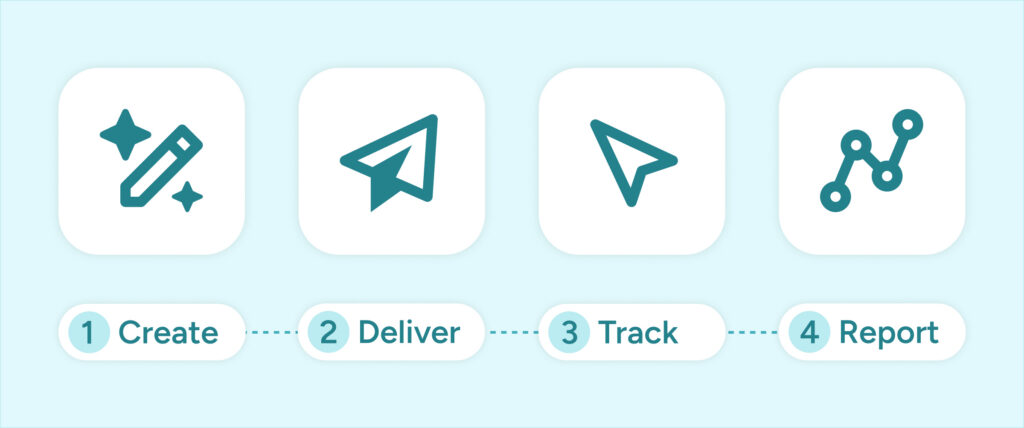
Create Content.
An administrator or instructional designer builds courses inside the platform or uploads existing material such as videos, slides, PDFs, and interactive modules. Related courses can be grouped into learning paths that move a learner from beginner to advanced.
Deliver Content.
The LMS makes courses available to the right people. Administrators enroll learners individually, by group, or automatically based on role, department, or membership type. Learners reach the material through a web browser or a mobile app.
Track Progress.
As learners move through content, the system records their activity: which lessons they opened, how they scored on assessments, how much time they spent, and whether they completed the course.
Report Results.
The platform turns that activity into reports. Managers can see completion rates, spot who is falling behind, measure assessment results, and export records for audits or compliance reviews.
Under the hood, most platforms rely on technical standards called SCORM (Sharable Content Object Reference Model) and xAPI (Experience API). These standards let course content and the LMS communicate, so the system can reliably record scores, completions, and other activity no matter who built the course.
Key Features of a Learning Management System
Capabilities vary by platform, but a capable LMS includes most of the following.

Types of Learning Management Systems
Learning management systems differ mainly in how they are hosted and who they are built for.
Cloud-based (SaaS).
A cloud-based, or software-as-a-service, LMS is hosted by the vendor and accessed over the internet. You don’t install anything, updates happen automatically, and the vendor handles security and maintenance. This is the most common model today.
Self-hosted.
A self-hosted LMS runs on your organization’s own servers. It offers more control and deeper customization, but your team handles hosting, updates, and security. It usually requires technical staff.
Open-source.
Open-source platforms make their code freely available, so organizations with development resources can customize them heavily. Moodle is a widely used example. The software is free, but hosting, customization, and support are not.
Commercial (proprietary).
Commercial platforms are paid products maintained by a vendor. They typically cost more up front but include support, regular updates, and a polished out-of-the-box experience.
Corporate versus academic.
Some platforms are designed for workplace training, with features for compliance, onboarding, and skills development. Others are built for schools and universities, with tools for grading, assignments, and semester scheduling. A third variety serves associations and professional organizations, built around continuing education and certification.
Who Uses an LMS?
Organizations across sectors use an LMS once training outgrows a room. That includes:
- HR and learning and development (L&D) teams running onboarding and compliance training.
- Instructional designers who build and maintain courses.
- Corporate training managers responsible for employee skills and development.
- K-12 and higher education administrators and teachers delivering coursework.
- Healthcare organizations keeping clinical staff current on certifications and protocols.
- Government agencies training employees on policy, security, and compliance.
- Associations and professional organizations delivering continuing education to members.
LMS Use Cases Across Industries
Corporate training.
Companies use an LMS to onboard new hires, roll out compliance training, and build employee skills. Instead of scheduling repeated in-person sessions, they assign a course once and automatically track completion.
Education.
Schools, colleges, and universities deliver coursework, collect assignments, run assessments, and post grades through an LMS, both in the classroom and fully online.
Healthcare.
Hospitals and clinics use an LMS to keep clinical staff current on certifications, safety protocols, and regulatory requirements, with documented proof ready for audits.
Government and public sector.
Agencies train employees on policy, security, and compliance, then maintain the records that satisfy oversight requirements.
Professional development and continuing education.
Associations and professional organizations deliver the courses members need to earn and keep their credentials. The LMS tracks credits, issues certificates, and manages renewals, often tied directly to membership.
How to Choose the Right LMS for Your Organization
The right platform depends on what you are trying to accomplish. A few questions to ask yourself:
- What are your goals? Onboarding, compliance, continuing education, and customer education each favor different features.
- How many learners do you have, and who are they? Employees, students, and members have different needs.
- What content will you deliver? Video, live sessions, interactive modules, and documents each require different support.
- What reporting do you need? Compliance-heavy fields need detailed, exportable records.
- What does it need to connect to? Confirm it integrates with your HR system, member database, or payment tools.
- What is your budget, and how will it scale? Account for setup, per-user pricing, and support as you grow.
- How easy is it to use? Adoption drops fast if learners or administrators find the platform confusing.
Shortlist two or three platforms, request demos, and, where possible, run a small pilot before you commit.
Deliver Better Learning with Momentive
If your organization delivers continuing education, certifications, or professional development, generic corporate training software rarely fits. Credits, renewals, and member records add requirements most platforms were never built to handle.
Path LMS, Momentive’s learning management software, is built for associations, professional organizations, and mission-driven teams. It brings course delivery, credit tracking, and certification management into one platform, connected to the tools you already use to manage members.
Frequently Asked Questions
An LMS (learning management system) delivers and tracks training for learners. An LCMS (learning content management system) focuses on creating and managing the content itself, often across multiple authors. In short, an LMS manages learners while an LCMS manages content. Some platforms combine both.
Widely used platforms include Moodle, Canvas, Blackboard, TalentLMS, Docebo, and SAP Litmos. For associations and professional organizations, purpose-built options such as Path LMS handle continuing education and certification.
At minimum: course authoring, enrollment and user management, assessments, progress tracking, reporting, and certification support. Mobile access, integrations, and automation matter more as your program grows.
Usually, even small teams benefit once training becomes repetitive or needs documentation. A cloud-based LMS with per-user pricing lets a small organization start without a large investment and add learners over time.
A cloud-based LMS is hosted by the vendor and accessed online, with the vendor handling maintenance and updates. A self-hosted LMS runs on your own servers, giving you more control but requiring technical staff to manage it. Most organizations choose cloud-based for the lower overhead.
An LMS makes training consistent and measurable. Learners get the same quality material at their own pace, administrators can see who is struggling and step in, and because everything is tracked, organizations can prove training happened and connect it to results.
Struggling to keep your volunteer program organized? Discover what volunteer management software can do for your organization.