

If you’re planning your annual conference, educational symposium, or professional development event, you’ve likely heard about mobile event apps. Because most (77%) marketers say events are one of their most effective marketing channels, many are leaning on technology for help. Almost all (nearly 90%) event planners said they’ll use a mobile app for an upcoming event.
And for good reason: many report positive ROI from these high-tech tools, and most attendees now expect them as part of the event experience.
An event app is a mobile application tailormade for conferences, meetings, and events. Mobile apps are one-stop shops for event planners and attendees. You can typically review schedules, connect using networking tools, participate in giveaways and contests, and peruse exclusive content all in one convenient digital space.
As a result, these platforms are now essential for events of all sizes across industries.
In this comprehensive guide, you’ll learn everything you need to successfully select and implement an event app for your organization:
- What event apps are and how they support attendees throughout the event lifecycle
- Essential features to prioritize (must-haves versus nice-to-haves) based on your event type and size
- How to choose the right app for your budget and business needs
- A 30/60/90-day implementation timeline to ensure launch success
- Proven strategies to achieve strong adoption rates (when most organizations struggle with low engagement)
- How to get the most value from event apps when integrated with broader event management platforms
What are Event Apps?
Event apps are mobile applications specifically designed for events, conferences, and meetings that centralize features that both event planners and attendees need. These platforms often support both audiences before, during, and well after the event has ended.
Unlike generic communication tools, these specialized platforms can handle the unique workflows of live events.
Types of Event Apps
Understanding the different types of event apps will help you choose the right technology for your needs and budget.
Native Apps (iOS/Android)
Native apps are built specifically for iOS or Android operating systems. They offer the best performance, offline access, push notifications, and seamless integration with device features like cameras and calendars.
Best for: Native apps are best for large conferences with 1,000+ attendees and multi-day events where performance (think real-time updates) and reliability are critical.
Web Apps (Browser-Based)
Web apps are accessed through mobile browsers without requiring any download. They’re cross-platform by nature, easier to update, and comparatively cheaper and faster to develop than native apps.
The trade-off? Web apps require an internet connection and have limited access to device features.
Best for: Small events (50-200 attendees), one-day events, or situations with tight budgets where download friction might hurt adoption.
Hybrid Apps
Hybrid apps combine native and web technologies to give you the best of both worlds. Hybrid apps use a single codebase that works across platforms.
Best for: medium-sized events (200-1,000 attendees) and recurring events where you want good performance without native app development costs.
Progressive Web Apps (PWAs)
PWAs represent a modern alternative: web apps that feel and function like native apps. They don’t require app store approval, work offline, and support push notifications.
Best for: Tech-savvy audiences, organizations wanting a modern solution without app store hassles, and situations requiring rapid deployment
Event App Types: Comparison Table
| App Type | Definition | Cost Range | Pros | Cons | |
| Native Mobile Apps | Applications built specifically for a single platform (iOS and/or Android). These are completely customizable and are often the gold standard for event apps. | Custom event app: $10K-$50K Costs will vary based on platform | • Best performance and speed • Full access to mobile device features (camera, GPS, notifications)• Superior user experience (UX)• Can work offline• App store discoverability | • Highest cost • Requires separate codebase for each platform• Longer development time (months or years per platform, depending on complexity)• Requires platform-specific expertise• Higher maintenance costs | |
| Web-Based Apps | Responsive websites optimized for mobile devices, accessed through web browsers. No download required. | Often included in platform pricing or $5k-$25k standalone | • Lowest development cost• Single codebase for all platforms• No app store approval needed• Easiest to maintain and update• Works on any device with internet access | • Requires internet connection• Limited access to device features • No app store presence for discoverability• Performance may vary by browser• Multi-step access (open browser, find app) | |
| Hybrid Apps | Apps built using web technologies (HTML, CSS, JavaScript) wrapped in a native container, which allows app store downloads while using only one codebase. | $12k-$35k (typical) | • Single codebase for multiple platforms • Lower cost than native (30-50% savings)• Faster development (half the time of native)• App store distribution • Access to device features via plugins• No need for platform-specific developers | • Limited access to some native features• Additional workarounds may increase cost • User experience may vary | |
| Progressive Web Apps (PWAs) | Web applications that use modern browser capabilities to provide app-like experiences, including offline functionality, push notifications, and home screen installation, all without app store distribution | $5k-$25k (basic) $15k-$200k (complex) | • Most cost-effective cross-platform solution• No app store approval needed• Single codebase for all platforms • Offline functionality • Push notifications • Automatic updates • Installable on device• Better SEO than native apps | • Limited access to some device features• Not all browsers support all features• No app store presence (less discoverability) • Can have less seamless performance than native |
Event apps vs. Event management software
It’s important to distinguish between event apps and event management software—they serve different audiences but can work together seamlessly.
Event apps are attendee-facing, mobile-first, and engagement-focused. This is what your attendees see and interact with during your event. Event management software is organizer-facing and includes registration, speaker management, exhibitor coordination, and analytics. This is what you as a planner use to run your event behind the scenes.
The most effective event technology integrates both. Platforms like Momentive Software’s event management solution offer both components together, so attendee data flows seamlessly from registration into the mobile app.
How Event Apps Support the Event Lifecycle
Modern event apps help planners through the entire event lifecycle:
- Before the Event. Attendees browse the agenda, build personal schedules, connect with other registered attendees, pre-schedule meetings, and review speaker bios. This pre-event engagement builds anticipation and helps attendees plan a tailored experience.
- During the Event. QR code check-in streamlines entry, real-time updates keep everyone informed of schedule changes, interactive polls and Q&A increase session engagement, venue maps help attendees navigate, exhibitor directories facilitate discovery, and live networking tools enable spontaneous connections.
- After the Event. Session recordings extend content value, presentation downloads provide lasting resources, surveys gather feedback, and continued networking sustains valuable connections. Almost all (93%) attendees say companies do a good job translating in-person experiences to digital iterations that live on long after the event ends.
The Benefits of Event Apps
Event apps provide both attendees and event planners a wealth of benefits, particularly around time and cost savings. Here’s what you can expect when you implement one effectively.
For Event Organizers
Massive Time Savings
Event apps eliminate countless manual processes: printing schedules, updating attendees about changes, fielding information requests, and managing registration logistics. Almost all (89%) businesses in one study saved a whopping 200 hours per year with event technology.
Plus, real-time changes are pushed instantly to all attendees’ devices. No more reprinting materials or making announcements over loudspeakers. Update the session time in your dashboard, hit publish, and everyone knows immediately.
Significant Cost Savings
Event apps and event management technology can significantly cut costs for organizations. For example, badge printing can cost from under $2 per badge for pre-printed options to $3-$10 for professional printing services. For hundreds or thousands of attendees, those costs add up. And that doesn’t include program books, handouts, and signage.
Fortunately, an event app can either reduce or eliminate these hefty printing costs. Attendees can use virtual badges, review the full event agenda, get details on each session, and find venue maps all within the app.
Self-service check-in kiosks also help bring down costs and reduce staffing needs at registration desks. Using the app, attendees can scan QR codes and move through quickly without requiring one-on-one in-person attention.
Proven ROI
The numbers speak for themselves: Event marketing in general generates 338% more revenue than traditional advertising, and apps amplify that advantage. Seventy-eight percent of companies report better overall event ROI when using apps.
And 44% of event attendees agree that technology that makes consuming events easier is one of the most important event experience elements.
Rich Data and Analytics
Event apps provide unprecedented insight into attendee behavior. Organizers can track which sessions are most popular in real-time, measure attendee engagement minute-by-minute, prove sponsor ROI with impression data, and gather insights that improve future events through event management analytics.
New Revenue Streams
Event apps can help create sponsorship opportunities that didn’t exist before. Depending on your event’s size, you can set up multiple sponsorship tiers as an additional income source. For example, premium exhibitor placements in the app directory, featured sponsor push notifications, and banner ads all represent new revenue potential.
The National Shooting Sports Foundation saw success with this method when organizing its Shooting, Hunting, and Outdoor Trade Show (SHOT Show). They leveraged an event app for their massive event (60,000-70,000 attendees and 2,300+ exhibitors) and saw incredible results:
- 169% revenue increase in event app sponsorship in the first two years
- Doubled revenue again in subsequent years
- 340,000+ visits to the SHOT Show mobile app in 2014 alone
For Attendees
Personalized Experience
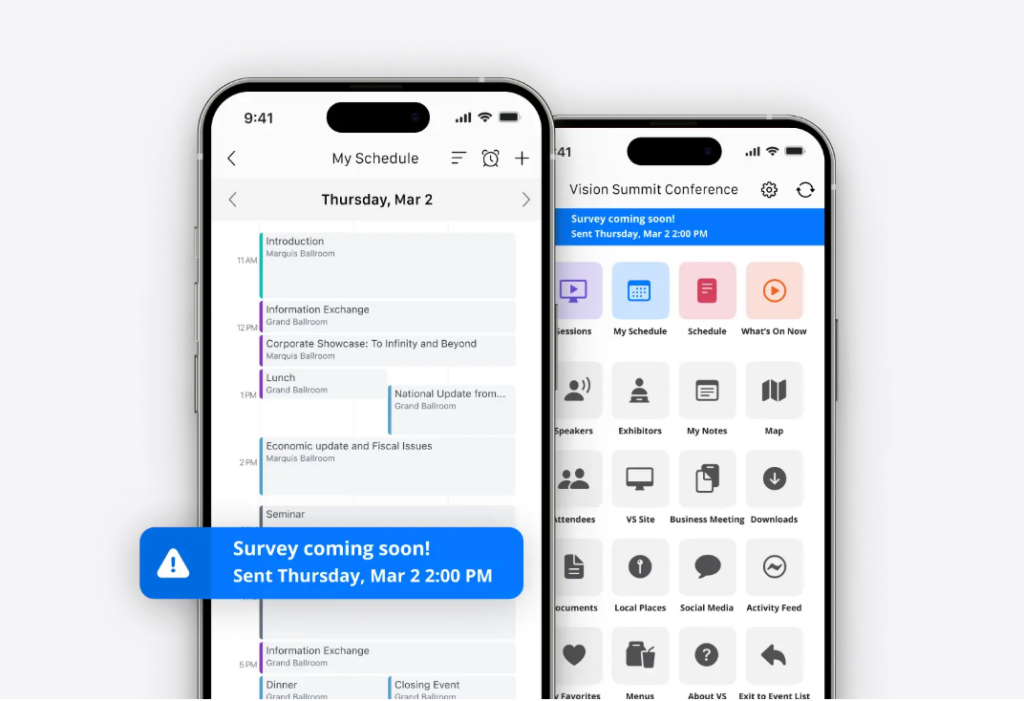
With event apps, attendees can build custom agendas based on their specific interests, get AI-powered recommendations (50% of planners now use AI for personalization), and skip irrelevant content to focus on what matters to them.
Enhanced Networking
Networking is the number one reason people attend events, and apps make it dramatically easier.
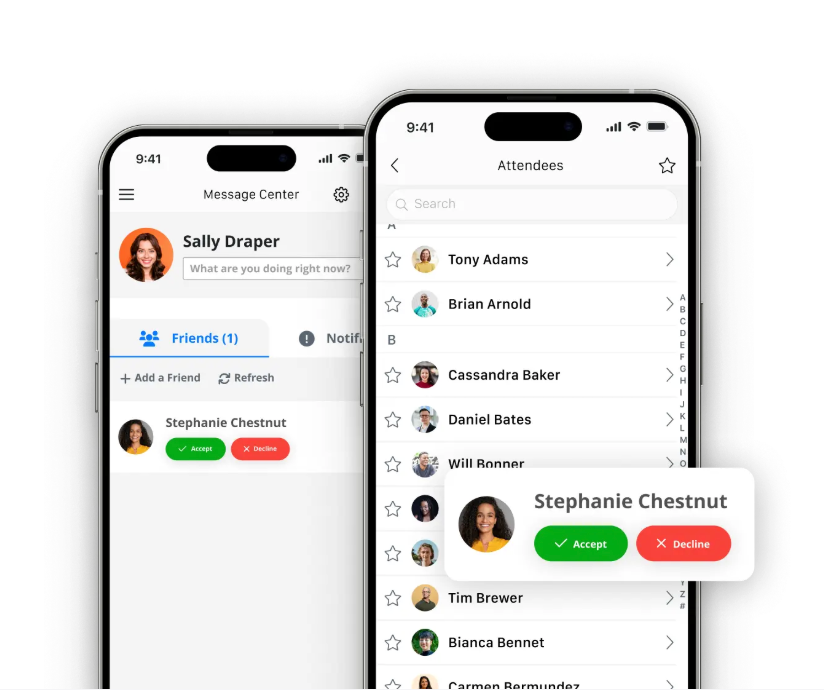
Attendees can get a jump on networking before the event even begins. Within an event app, attendees can sneak a peek at who else has RSVPed, send 1:1 messages and schedule meetings in advance, find people with similar interests through searchable profiles, exchange digital business cards instantly, and continue conversations after the event ends.
Digital Convenience
Every important detail lives in one place on attendees’s phones. Attendees don’t have to carry heavy programs, worry about lost materials, or search for paper schedules. Instead, they can instantly access slides and recordings from presentations, create a custom event agenda, and more. Everything is at their fingertips.
Plus, digital-only materials support environmental sustainability—something attendees increasingly care about.
Active Participation
Apps transform attendees from passive observers to active participants. Attendees can vote in live polls during sessions, submit questions to speakers via Q&A, participate in gamification challenges for prizes, and share photos and experiences with other attendees.
Six Essential Event App Features (Plus Five Nice-to-Have Features)
Not all features are created equal. Here’s how to prioritize based on what truly matters versus what’s just nice to have.
Must-Have Features (Non-Negotiables)
These are non-negotiables—this list compiles features that 100% of attendees expect and that form the core functionality of any event app.
1. Interactive Agenda and Schedule Builder
Your event app must allow attendees to browse all available sessions and build personalized schedules that align with their interests and goals. Attendees should be able to add sessions to their personal agenda with just a tap, and the app should automatically send reminders before each session starts.
This customization capability is expected by 100% of event attendees—it’s the primary reason people download event apps in the first place. Personal schedules with automated reminders dramatically reduce confusion about session locations and timing, helping attendees make the most of their conference experience without constantly consulting a printed program.
2. Push Notifications
Push notifications enable you to send real-time updates instantly to attendees’ lock screens, ensuring critical information reaches them immediately. Push notifications average a 20% open rate with immediate visibility, compared to emails that may go to spam folders or get buried in crowded inboxes.
Use push notifications for schedule reminders (“Your session starts in 15 minutes—Room 200A”), urgent announcements about venue or schedule changes, and time-sensitive information during the event.
However, restraint is important: limit notifications to 5-7 per day to avoid notification fatigue. Too many notifications can lead attendees to disable them entirely or develop negative associations with your event.
3. Attendee Networking and Profiles
Networking consistently ranks as the number one reason people attend events, which means robust networking features are essential. Your app should include a searchable attendee directory where participants can browse profiles, filter by industry or interests, and find relevant connections.
One-to-one messaging capabilities allow attendees to reach out and start conversations, while integrated meeting scheduling tools help them coordinate coffee meetings or dinner plans during the event.
Digital contact exchange through an event app is nearly three times more likely to generate reciprocal connections compared to traditional paper business cards, which often end up lost or thrown away without follow-up. For association events, consider implementing tiered access by membership level to provide additional value to your member attendees.
4. Venue Maps and Navigation
Interactive floor plans showing exhibitor locations, session rooms, restrooms, food stations, and other key areas are crucial for helping attendees navigate large conference venues efficiently. These digital maps reduce the volume of basic navigation questions directed at venue staff, freeing your team to handle more complex attendee needs.
More importantly, they prevent attendees from missing sessions because they couldn’t find the room—a surprisingly common problem at large conferences held in convention centers or sprawling properties.
Well-designed venue maps include search functionality, turn-by-turn directions, and the ability to tap an exhibitor or session in the agenda and immediately see its location on the map.
5. Live Polling and Q&A
Real-time audience participation features during sessions are now standard expectations rather than optional extras. Live polling allows speakers to gauge audience understanding, gather instant feedback, or make sessions more interactive by letting attendees vote on topics or questions.
Q&A functionality gives attendees a way to submit questions to speakers without having to raise their hand or approach a microphone—particularly valuable for attendees who may be shy or prefer written communication.
Research shows that 60% of event planners identify apps as their most vital tool for engagement. Sessions featuring live polls and Q&A see significantly higher participation rates and attendee satisfaction scores. Link these features to your broader conference session engagement strategies to maximize their impact.
6. Exhibitor and Sponsor Profiles
A searchable exhibitor directory with booth numbers, company descriptions, and contact information helps attendees discover relevant exhibitors and plan their exhibit hall time strategically. The directory should include advanced search and filtering options so attendees can find exhibitors by category, product type, or solution.
Lead scanning capabilities are becoming standard rather than optional—67.2% of event platforms now include this functionality. Lead scanning allows exhibitors to quickly capture attendee contact information by scanning their badge QR code, dramatically streamlining the lead collection process compared to manual data entry or business card collection.
Additionally, premium placements within the exhibitor directory (featured listings, banner ads, or sponsored push notifications) represent significant sponsorship revenue opportunities that can offset your app investment costs.
Nice-to-Have Features (Competitive Differentiators)
These features provide competitive advantages and can significantly enhance the attendee experience, but they’re not dealbreakers if missing.
7. Gamification
Gamification features use game mechanics—points, leaderboards, badges, and challenges—to drive desired attendee behaviors such as visiting exhibitor booths, attending sessions, completing surveys, or networking with other participants. Currently, about 70% of Fortune 1000 companies leverage gamification strategies
However, poorly designed gamification (unclear rules, unattainable goals, or meaningless prizes) can backfire and create attendee frustration. Invest time in designing your gamification strategy carefully.
8. AI-Powered Matchmaking
Artificial intelligence-powered matchmaking analyzes attendee profiles, interests, session attendance patterns, and stated goals to suggest relevant connections they might not have discovered on their own. This feature is particularly valuable at large conferences where attendees might feel overwhelmed by the prospect of networking with hundreds or thousands of other participants.
AI matchmaking helps attendees cut through the noise to find the right people—whether that’s potential clients, collaborators, mentors, or peers facing similar challenges in their work.
9. Lead Scanning and Retrieval
Lead scanning allows exhibitors to scan attendee badge QR codes with their smartphone or tablet to instantly capture contact information, eliminating manual data entry and ensuring accuracy. This feature is absolutely critical for trade shows where lead generation is the primary goal for exhibitors, though it’s less essential for educational conferences or member-focused association events.
The real value comes from seamless integration with Customer Relationship Management (CRM) systems like Salesforce, HubSpot, or Zoho. Leads should flow directly into exhibitors’ existing sales workflows automatically, enabling immediate follow-up while conversations are fresh.
Without CRM integration, exhibitors must manually export and import lead data, creating friction that reduces the feature’s value substantially.
10. Multi-Language Support
For international conferences or events with significant international attendance, the ability to display the app interface and event content in multiple languages is essential for creating an inclusive experience. Don’t assume all attendees speak English fluently, even at English-language conferences.
Multi-language support should extend beyond just the app interface to include translated session descriptions, speaker bios, and exhibitor information. The best implementations allow attendees to switch languages on the fly within the app rather than having to configure language settings during initial setup.
11. Offline Access
Offline access ensures that core app features—personal agenda, venue maps, exhibitor directory, and attendee profiles—remain accessible even without internet connectivity. This capability is more important than many planners realize because poor WiFi remains surprisingly common at event venues, even in major convention centers.
Venue WiFi networks often become overloaded when hundreds or thousands of attendees connect simultaneously, causing slowdowns or complete outages.
Native mobile apps (built specifically for iOS or Android) handle offline access much better than web-based apps, which typically require constant internet connectivity. When evaluating platforms, test offline functionality yourself by turning on airplane mode and attempting to use key features.
Feature Prioritization by Event Type
| Event Type | Features to Prioritize |
| Corporate Conferences | • Interactive agenda with session filtering• Live polling and Q&A• Materials library (presentations, handouts)• Session feedback and evaluation forms• Speaker profiles and bios |
| Trade Shows | • Exhibitor directory with advanced search• Lead scanning and retrieval• Interactive floor maps• Booth navigation and wayfinding• Product showcase galleries• CRM integration for lead flow |
| Association Events | • Member directory (searchable by chapter, specialty)• Networking tools (1:1 messaging, meeting scheduler)• CE credit tracking and certificates• Member vs. non-member access tiers• Volunteer coordination• Integration with association management software (AMS) |
| Hybrid Events | • Live streaming integration (Zoom, Hopin)• Virtual attendee networking and chat• Session recordings and on-demand access• Dual audience engagement (in-person + virtual)• Virtual Q&A alongside in-person polling• Separate analytics for in-person vs. virtual engagement |
| Small Events (<200 attendees) | • Agenda with personal schedule builder• Basic networking (attendee directory)• Venue information and maps• Push notifications for updates• Note: A web app is often sufficient |
| Large Events (1,000+ attendees) | • Advanced analytics dashboard• Multiple admin roles and permissions• White-label branding (hide vendor logo)• AI-powered matchmaking• Beacon technology for navigation• Multi-track agenda management• Robust sponsorship tools |
How to Choose the Right Event App
Choosing the right event app requires matching your specific needs to the right solution. Here’s a practical framework:
Table 1: By Event Size
| Event Size | Recommendations | Essential Features | Budget (Per Event) | What to Skip | Adoption Target |
| Small to Medium (500-1,000 attendees) | Web app or hybrid app Best for: Organizations with tight budgets or first-time app usersWhy: Easier to update, faster to deploy, lower development costs | • Agenda with personal schedule builder• Attendee networking• Venue maps• Basic exhibitor directory• Push notifications | $1,499-$6,000 | •Enterprise-grade features• Complex AI matchmaking• Advanced sponsorship tools• Multiple admin roles• White-label branding | 60-70% is solid for this size |
| Large Events (1,000-3,000 attendees) | Native or hybrid app with robust features Best for: Organizations wanting strong performance and reliability Why: Better offline capabilities, enhanced user experience, professional appearance | All small-medium features PLUS:• Live polling/Q&A• Enhanced exhibitor tools• Lead scanning•Gamification• Session feedback• Multi-track agenda management | $12,000-$50,000 | • Overly complex integrations• Unused advanced features• Custom development that exceeds budget | 70-80% |
Table 2: By Event Type
| Event Type | Recommendations | Priority Features | Budget Considerations | What to Skip | Special Considerations |
| Association Conferences and Annual Meetings | Hybrid or native app with year-round access Integration with AMS is critical | • Member directory (searchable)• CE credit tracking• Year-round community features• Session management• Robust networking• Live polling/Q&A• Member vs. non-member access tiers• Chapter information• Volunteer coordination | Consider annual licensing vs. per-event pricing Most associations host multiple events annually | •Single-event-only solutions• Platforms that don’t integrate with AMS• Apps without member tiering | Integration with AMS is critical Must sync with:• Member database• Chapter structure• Dues status Look for: association-specific features |
| Educational and Professional Development Events | Platform with strong learning management integration | • CE credit tracking and certificates• Session evaluation forms• Speaker profiles• Materials library• Detailed agenda with track filtering• Certificate distribution | Similar to association pricing Essential: Budget for LMS integration | • Apps without certification workflows• Platforms lacking evaluation tools• No integration with accreditation bodies | Essential for:• Healthcare associations• Professional licensing boards• Continuing education providers Must integrate with:• Learning management systems• Certification tracking platforms |
| Trade Shows and Exhibitions | Native or hybrid with strong exhibitor tools Lead capture is non-negotiable | • Lead scanning and retrieval• Exhibitor directory with advanced search• Interactive floor maps• Booth navigation• Product showcase• Meeting scheduler | Revenue opportunity: Charge exhibitors $500-$2,000 for premium app placement Can offset app costs through sponsorships | • Apps without lead scanning• No CRM integration• Poor exhibitor directory experience | Integration requirement:Must connect with CRM systems (Salesforce, HubSpot) Revenue model:App can pay for itself through exhibitor packages |
| Hybrid Events | Platform with native virtual event capabilities Not retrofitted solutions | • Live streaming integration (Zoom, Hopin, Teams)• Virtual attendee networking• Session recordings• On-demand access• Dual audience engagement• Virtual Q&A• Separate analytics for in-person vs. virtual | Cost advantage:Virtual events cost 75% less when apps enable hybrid experiences | • Platforms that treat virtual as an afterthought• Separate tools for in-person and virtual• No unified analytics | Virtual component must be:• Native to platform (not add-on)• Equally engaging as in-person• Provide unified data/analytics 75% cost savings vs. purely in-person events |
| Small Events(<200 attendees) | Web app is often sufficientNo need for native apps | • Agenda with personal schedule builder• Basic networking• Venue information• Push notifications• Basic sponsor listings | Lowest cost option:Web apps often included in event management software or start under $1,000 | • Expensive native apps• Complex features you won’t use• Advanced gamification• AI matchmaking | Web app advantages:• No app store approval needed• Instant updates• Works on any device• No download friction Perfect for: One-day events, workshops, small meetings |
Checklist: How to Select the Right Event App for Your Organization
Use this checklist to evaluate potential vendors:
1. Ease of Use (Most Important)
- Can you update content without developer help?
- Red flag: Demo requires 30-minute training
- Vendor should prove 60%+ adoption rates
2. Customization
- Branding: Match event colors, fonts, logo?
- Features: Turn on/off specific modules?
- White-label: Hide vendor branding? (critical for large events)
3. Integration Capabilities
- Must integrate: [Registration system](Momentive registration URL), CRM, virtual platform (if hybrid)
- Verify: Ask for specific integration names
- Technical: API-based (best) or manual CSV imports (worst)?
4. Pricing Model
- Per-attendee: Typically $1.30-$13 per attendee (£1-£10) (most common, scalable)
- Flat-rate per event: $1,499-$50,000+ per event (predictable cost, varies by features and size)
- Annual licensing: $8,900+ per year for unlimited events (best for organizations with multiple events)
- Hidden costs: Setup fees, custom branding, integrations, support
5. Support and Training
- Pre-event: Onboarding, content loading, training
- Day-of: Phone support, on-site tech support
- Ask: “What support is included vs. extra cost?”
6. Security
- GDPR/CCPA compliant?
- SSO for corporate events?
- Member vs. non-member access control? (for associations)
Leverage this checklist when evaluating any potential event apps. Then, narrow your list down to 3-5 vendors. From there, you can request demos, check references, verify adoption rates, review contracts for hidden fees, and test attendee experience yourself.
Top Event Apps: 2026 Market Leaders
Selecting the right event app for your needs also requires understanding what’s available in the market. Based on G2 reviews, user ratings, and market presence, here are the top event app platforms to consider for your next conference or event.
1. Momentive
Overview
Momentive Software’s integrated event management platform is built specifically for associations and nonprofits, offering white-glove implementation and seamless ecosystem integration.
Best for: Associations, nonprofits, healthcare organizations, and professional development events requiring member management integration and CE tracking
Key Features:
- Integrated mobile event app as part of MomentiveIQ platform
- White-glove implementation (team builds and configures for you)
- Member vs. non-member access tiers and permissions
- CE credit tracking and certificate distribution
- Seamless integration with registration, badging, and learning management
- Year-round community features for associations
Pros
- Purpose-built for associations and nonprofits (deep industry expertise)
- Full-service support from planning through post-event analysis
- Unified platform approach (no juggling multiple tools)
- Proven at scale (500-10,000+ attendee events)
- All-in-one: registration, app, analytics in a single ecosystem
Cons
- Focused primarily on the association/nonprofit market
Pricing
Custom pricing based on organization size and needs; includes white-glove implementation support
2. Whova
Overview
Award-winning all-in-one event management platform with exceptional attendee engagement and networking features.
Best for: Associations, conferences, and trade shows seeking comprehensive event management with strong networking capabilities
Key Features
- Award-winning mobile event app
- Community Board for pre-event networking and engagement
- Integrated registration, agenda management, and check-in
- Live polling, Q&A, and session feedback
- Lead retrieval and exhibitor management
- Gamification with passport/stamp contests
Pros
- Intuitive interface requires minimal training
- Strong customer support with dedicated account managers
- All-in-one platform (website, registration, app in one system)
- Excellent attendee networking tools
- Competitive pricing for comprehensive features
Cons
- Some users report occasional notification overload
- Interface can feel slightly dated compared to newer platforms
- Limited advanced customization for white-label branding
Pricing
Custom pricing based on event size; generally competitive for mid-to-large events
3. Cvent Attendee Hub
Overview
Enterprise-grade event app that’s part of Cvent’s comprehensive event management ecosystem; the attendee hub is designed for large-scale corporate events.
Best for: Large enterprises, Fortune 500 companies, and major conferences requiring enterprise-level features and scalability
Key Features
- AI-powered networking and matchmaking
- Seamless integration with the Cvent Event Management platform
- Interactive agendas with personalized scheduling
- Live Q&A and polling during sessions
- Robust exhibitor profiles and lead generation
- Advanced analytics and reporting dashboard
Pros
- Extremely robust feature set for complex events
- Enterprise-grade security and compliance (SOC 2, GDPR, CCPA)
- Scalable for events of 10,000+ attendees
- Excellent integration with Cvent registration
- Strong analytics and ROI tracking
Cons
- High learning curve; complex setup process
- Premium pricing not suitable for smaller organizations
- Some users report interface can be overwhelming
- Setup requires significant time investment
Pricing
Custom enterprise pricing; typically higher-end of the market
4. Bizzabo
Overview
Modern, visually stunning event management platform known for its Event Experience OS and innovative smart wearable technology (Klik SmartBadges).
Best for: B2B conferences, corporate events, and organizations prioritizing attendee experience and sophisticated branding
Key Features
- Klik SmartBadges for contactless networking (drives 400% increase in networking)
- Custom-branded mobile app with real-time updates
- AI-powered attendee matchmaking
- Integrated registration, ticketing, and check-in
- Virtual and hybrid event capabilities with live streaming
- CRM integration (Salesforce, HubSpot, Marketo)
Pros
- Beautiful, modern interface and design
- Innovative smart wearables technology
- Excellent customer support (24/7 availability)
- Strong for hybrid and virtual events
- Comprehensive analytics and event intelligence
Cons
- Premium pricing (starting around $499/user/month for subscription model)
- Can be complex for first-time users
- Some users report occasional bugs
- Polling features may require third-party tools
Pricing
Subscription-based starting at $499/user/month; custom pricing for larger events
5. Webex Events (formerly Socio)
Overview
Enterprise event platform integrated with Cisco’s Webex ecosystem, designed for corporate in-person, virtual, and hybrid events.
Best for: Corporate enterprises already using Webex, large-scale conferences, and hybrid events requiring seamless virtual integration
Key Features
- Native integration with Webex for virtual/hybrid events
- Comprehensive event registration and management
- Attendee and badge management
- Custom branding and white-label options
- Real-time chat, Q&A, and polling
- In-depth reporting and analytics
Pros
- Seamless integration with Webex videoconferencing
- Strong for hybrid events (built-in virtual capabilities)
- Enterprise-grade security and reliability
- Excellent for organizations already in Webex ecosystem
- Robust feature set for complex events
Cons
- Can feel complex for new users (steep learning curve)
- Better suited for larger organizations
- Premium pricing
- May be overkill for simple in-person events
Pricing
Custom enterprise pricing; typically higher-end
Event App Platform Comparison Chart
| Platform | Best For | Event Types | Starting Price | White-Glove Support | Key Differentiator |
| Momentive | Associations & Nonprofits | Conferences, Annual Meetings, CE Events | Custom | ✅ Included | Association-specific features + unified ecosystem |
| Whova | General Conferences & Trade Shows | Conferences, Trade Shows, Hybrid | Custom (competitive) | ⚠️ Available | Award-winning networking & community features |
| Cvent Attendee Hub | Large Enterprises | Corporate Conferences, Large Events | Custom (premium) | ✅ Available (extra cost) | Enterprise scalability & comprehensive features |
| Bizzabo | B2B Conferences | Corporate, Hybrid, Virtual | $499/user/month+ | ✅ 24/7 support | Klik SmartBadges & modern design |
| Webex Events | Enterprise (Webex Users) | Corporate, Hybrid | Custom (premium) | ✅ Available | Webex integration & enterprise security |
Feature Comparison Chart
| Feature | Momentive | Whova | Cvent | Bizzabo | Webex |
| Mobile App | ✅ | ✅ | ✅ | ✅ | ✅ |
| Networking Tools | ✅ | ✅ Excellent | ✅ | ✅ AI-powered | ✅ |
| Gamification | ✅ | ✅ | ⚠️ Limited | ⚠️ Limited | ⚠️ Limited |
| Live Polling/Q&A | ✅ | ✅ | ✅ | ✅ | ✅ |
| Virtual/Hybrid | ✅ | ✅ | ✅ | ✅ Strong | ✅ Excellent |
| Lead Retrieval | ✅ | ✅ | ✅ | ✅ | ✅ |
| CE Credit Tracking | ✅ Built-in | ⚠️ Via integration | ⚠️ Via integration | ❌ | ❌ |
| Member Management | ✅ Native | ⚠️ Via integration | ⚠️ Via integration | ❌ | ❌ |
| Custom Branding | ✅ | ✅ | ✅ White-label | ✅ Excellent | ✅ |
| Registration Included | ✅ | ✅ | ✅ | ✅ | ✅ |
| Analytics/Reporting | ✅ | ✅ | ✅ Advanced | ✅ Advanced | ✅ Advanced |
| Offline Access | ✅ | ✅ | ✅ | ✅ | ✅ |
Legend: ✅ = Included/Strong | ⚠️ = Limited/Via Integration | ❌ = Not Available
Event App Implementation: 30/60/90-day Plan
Why timing matters: 90% of apps are downloaded once then deleted. Industry average adoption is only 20-30%. Best-in-class achieve 80-95% with proper implementation. Success is 20% app quality, 80% rollout strategy.
90 Days Before: Selection and Foundation
Weeks 1-2: Platform Selection
- Research 5-7 vendors, request demos from top 3-4
- Check references (ask about adoption rates specifically)
- Review pricing, contracts, hidden fees
- Decision made by end of week 2
Weeks 3-4: Contract and Setup
- Contract negotiation, budget approval
- Kickoff call with vendor
- Project team assigned: manager (owns timeline), content lead (sessions/speakers), tech support (integrations)
- Initial app configuration, branding setup, admin access granted
Deliverable: Platform selected, contract signed, team assembled, app shell configured
60 Days before: Content Loading and Integration
Weeks 1-2: Data Migration
- Import attendee data from your registration system
- Load session schedule (even if not finalized)
- Upload speaker profiles and photos
- Add exhibitor/sponsor information
- Create venue maps, configure push notification templates
Week 3: Integration Setup
- Connect registration system for real-time attendee sync
- Connect CRM for lead scanning (Salesforce, HubSpot)
- Set up analytics tracking
- Test virtual platform integration (if hybrid)
- Configure SSO (if it’s a corporate event)
Week 4: Internal Testing and Prep
- Internal QA with team (test every feature)
- Fix bugs, content errors
- Create speaker guide: “How to promote the app”
- Train speakers on polling/Q&A features
- Brief sponsors/exhibitors on app placement, lead scanning
Deliverable: App fully loaded, integrations working, team trained, ready for launch
30 days before: Launch and Promotion
Week 1: Soft Launch
- Release to early registrants (creates buzz)
- Send announcement email with download instructions
- Create QR code posters for registration materials
- Set up in-app welcome message
- Monitor initial adoption (target: 20% in first week)
Weeks 2-3: Email Campaign
- Email 1: “Download the app” (features overview)
- Email 2: “Build your schedule” (agenda tutorial)
- Email 3: “Start networking” (profile setup)
- Email 4: “Countdown” (final reminders)
- Include screenshots, videos, step-by-step instructions
Note: Email averages 20.5% open rate, 2.36% click rate—multiple touchpoints required
Weeks 2-3: Multi-Channel Promotion
- Social media posts with screenshots
- Speaker promotion: Ask speakers to promote to networks
- Sponsor promotion: Sponsors mention in marketing
- Registration confirmation: App download CTA
- Website banner: “Download the app”
Week 4: Incentivize Adoption
- Gamification: Award points for download, profile completion
- Exclusive content: App-only speaker interviews, materials
- Contest: “Complete profile by Friday to win [prize]”
- VIP access: Premium sponsor content only in app
- Goal: 60% adoption before event starts
Deliverable: 60%+ downloaded, profiles created, engagement starting
1 Week Before: Final Push
Monday-Wednesday: Final Updates
- Final session schedule loaded (lock it)
- All speaker bios complete, exhibitor profiles published
- Venue maps finalized, day-of notification schedule created
Thursday-Friday: QA and Support Prep
- Full QA test of every feature
- Test push notifications
- Print QR code posters for on-site registration
- Create help desk guide, train registration staff
- Set up backup plan (WiFi fails? App crashes?)
Weekend: Send final “event starts Monday!” push notification, 24-hour support team on standby
Deliverable: App ready, support team trained, 70-80% adoption achieved
Day of the Event: Support and Monitoring
- Morning: Welcome push notification, help desk with tablets, staff at registration, QR codes at entrance
- Throughout: Monitor real-time analytics, respond to support within 15 minutes, send timely push notifications, encourage from stage (“Open app and vote!”), track adoption hourly (goal: 85%+ by end Day 1)
- Deliverable: 85%+ adoption, high engagement, minimal issues
Post-Event: Analysis and Archiving
- Week 1: Thank you push notification with survey, enable post-event content (recordings, slides), export all data, generate sponsor reports
- Week 2: Review metrics (final adoption rate, most attended sessions, networking activity), team debrief, document lessons learned
- Week 3-4: For associations: Keep app active year-round. For annual events: Archive but keep downloadable.
- Deliverable: Complete analytics package, lessons documented, data archived
How to Drive Event App Adoption
App adoption isn’t completely about the app itself—it’s about your promotion strategy. With the right marketing initiatives, planners can boost app usage even before the event begins.
Pre-Event Promotion (6-8 Weeks Out)
Launch Early (3+ Weeks Before)
Early launch—3+ weeks before your event—significantly increases adoption compared to last-minute releases. A soft launch to early registrants builds momentum and creates exclusivity. Early adopters then influence others through social proof.
Email Sequence (Not Just One Email)
Send multiple emails over several weeks:
- Week 6: Announcement (“Download the app!”)
- Week 4: Features (“Build your perfect schedule”)
- Week 2: Networking (“See who’s attending”)
- Week 1: Countdown (“Everything in one place”)
- Multiple touchpoints required for maximum reach
Incentivize Downloads
Gamification works: Give 100 points for downloading and 50 for completing a profile. Offer exclusive content like app-only speaker interviews. Run prize drawings: “Complete your profile by Friday to win.” Consider providing VIP access to premium sponsor content only in the app.
Gamification and exclusive content demonstrably drive downloads.
Speaker and Sponsor Co-Promotion
Ask speakers to promote the app to their networks. Provide a template: “Download the app to add my session: [link].” Then, encourage sponsors to mention the app in their pre-event marketing.
This borrowed audience effect multiplies your reach exponentially.
Make it Unavoidable
Include the app download link in every registration confirmation email. Add a “Download App” CTA website banner. Post regularly on social media with screenshots showing app features.
Read more: Top 25 Conference Content Marketing Ideas
Event-Week Tactics
QR Codes at Registration
QR codes simplify the download process dramatically, especially for walk-in registrants who didn’t pre-register. Place large posters with QR codes at your registration desk or check-in kiosks, as well as training staff to say: “Scan here while you wait.”
Digital-Only Schedules (Force Function)
Don’t print paper schedules—make the app the only source of schedule information. Communicate this as environmental: “Save the planet! All event info is in the app.”
Keep a limited number of printed schedules at the help desk as a safety net. Digital-only schedules strongly encourage app adoption.
On-site Ambassadors
Equip staff and volunteers with tablets and have them roam the registration area. They can help attendees download the app, set up profiles, and navigate features. Personal assistance improves adoption, especially for less tech-savvy attendees.
Time-Sensitive Push Notifications
Send notifications like “Keynote starts in 15 minutes—Room 200A,” “Lunch served—Level 2,” and “Happy hour at booth #47—free drinks!”
These create FOMO and make the app immediately useful. Best practice: limit to 5-7 notifications per day to avoid overwhelming attendees.
Display Live Stats as Social Proof
Show a screen at registration displaying: “Join 847 attendees using the app!” Update the number every 5 minutes to show growth. Social proof powerfully drives behavior.
During-Event Engagement
- Scavenger Hunts: “Visit 5 booths, scan QR codes to win” (drives booth traffic and engagement)
- Live Polling: Speakers say “Open app, vote now!” (significantly increases session engagement)
- Exclusive Offers: “Show this screen at Booth #23 for free T-shirt”
- Photo Contests: “Post event photo in app to win”
- Leaderboards: “Top 10 most engaged attendees” with points for attendance, booth visits, surveys (well-designed gamification drives strong participation)
Measuring Success
Now that you have your adoption strategy, you’ll need to ensure you know how to measure your event app’s success.
Adoption benchmarks:
- Poor: <40% (major issues)
- Average: 40-60% (industry baseline)
- Good: 60-80% (solid execution)
- Excellent: 80-95% (best-in-class)
Key metrics:
- Pre-event: Downloads as % of registrants (target: 60%)
- Day 1: Active users as % of attendees (target: 70%)
- Day 2+: Continued usage (target: 85%+)
Mid-event course correction (if <50% by end Day 1):
- Offer immediate incentive: “Download now for 500 bonus points”
- Increase on-site support presence
- More frequent push notifications
- Make something exclusive app-only
Sustain Attendee Engagement Post-Event
- For annual events: Continue highlights, share recordings (app-only), announce next year’s dates early
- For associations: Keep active year-round with community features, a monthly newsletter via push, chapter meetings, a job board, member directory
FAQ
What Is an Event App?
An event app is a mobile or web application that helps organizers manage schedules, networking, announcements, and engagement during conferences or events.
Why Should Organizers Use an Event App?
Event apps improve attendee engagement, streamline communication, and provide real-time updates to make events more organized and interactive.
What Features Should an Event App Include?
Key event app features include agenda management, attendee networking, push notifications, live polling, sponsor listings, and event analytics.
How Do You Choose the Right Event App?
Choose an app that integrates with your event platform, supports engagement tools, provides analytics, and fits your event size and budget.
When Should You Implement an Event App?
It’s best to launch an event app several weeks before the event so attendees can download it, build schedules, and explore features in advance.


